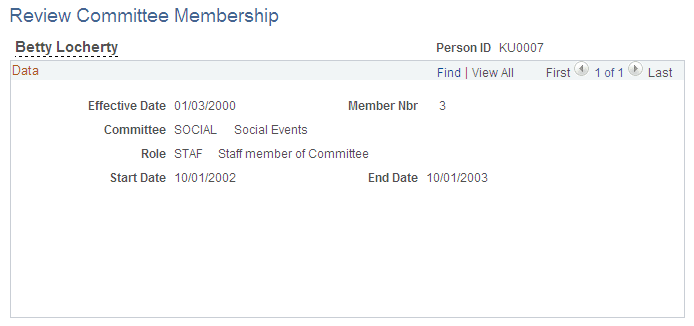
Tracking Committee Information
To set up and track committees, use the Committee Type (EG_COMMITTEE_SETUP), Committees (EG_COMMITTEE_MAINT), and Review Committee Membership (EG_COMM_MBRS) components.
Pages Used to Track Committee Information
| Page Name | Definition Name | Usage |
|---|---|---|
|
EG_COMMITTEE_TABLE |
Maintain committee types and committee roles within each type. |
|
|
EG_COMMITTEE |
Establish a committee and attach a committee type. |
|
|
EG_COMMITT_MEMBRS |
Assign employees to a committee. |
|
|
EG_COMM_MBR_VW |
View the committees to which an individual employee belongs. This page is display-only. |
Faculty-Committee Type Page
Use the Faculty-Committee Type page (EG_COMMITTEE_TABLE) to maintain committee types and committee roles within each type.
Navigation:
This example illustrates the fields and controls on the Committee Type page.
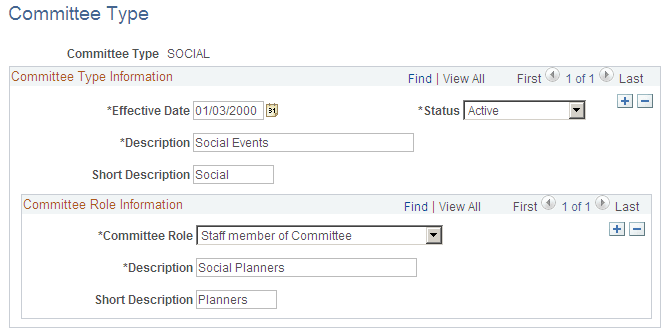
Committee Role Information
| Field or Control | Description |
|---|---|
|
Committee Role |
Select a role in the committee type, such as Admin Supp (administrative support). Note: You can add additional committee roles to new committee types only, but not to existing committee types. |
Committee Page
Use the Committee page (EG_COMMITTEE) to establish a committee and attach a committee type.
Navigation:
This example illustrates the fields and controls on the Committee page.
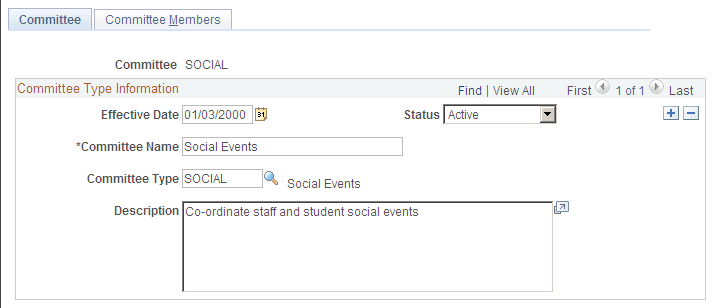
Committee Type Information
| Field or Control | Description |
|---|---|
|
Committee Type |
Select the type of committee, such as Social, Research, or Education. |
Committee Members Page
Use the Committee Members page (EG_COMMITT_MEMBRS) to assign employees to a committee.
Navigation:
This example illustrates the fields and controls on the Committee Members page.
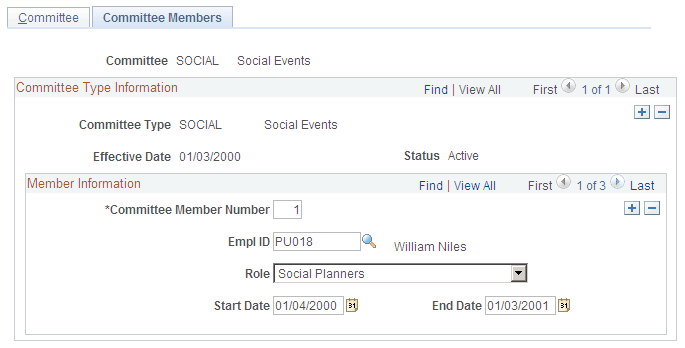
Member Information
| Field or Control | Description |
|---|---|
|
Committee Member Number |
Displays the number of committee members in increments of one for each new row. |
|
Role |
Select the role of the committee member. |
|
Start Date and End Date |
Enter the beginning and ending dates of the committee membership. |