Tracking Faculty Events
This topic lists common elements and discusses how to track various faculty events.
Pages Used to Track Faculty Events
| Page Name | Definition Name | Usage |
|---|---|---|
|
EG_ACTIVITIES |
Track employees' research activities by type of academic activity, date, sponsor, and organization. |
|
|
EG_ADMIN_POST_TBL |
Set up administrative posts. |
|
|
EG_ADMIN_POSTS |
Track administrative posts and appointments and titles that you do not want to track in the Job Data component. Before using this page, set up the Faculty Events - Administrative Posts page (EG_ADMIN_POST_TBL). |
|
|
EG_PRESENTATIONS |
Track information about presentations given by employees. |
|
|
EG_PUBLICATIONS |
Track information about the employees' published works. |
|
|
EG_ADVISEMENT |
Track information about any advisement activities. |
|
|
EG_TEACHING_RESP |
Track faculty teaching responsibilities. |
Common Elements Used to Track Faculty Events
| Field or Control | Description |
|---|---|
|
Average Grade |
Enter an average grade, using letters or numbers. For example, 3.8. |
|
School Code |
Select a school code. When you press the tab key, the system automatically displays the school name, state, and country. If no code exists, enter the school name in the related field. Maintain school codes in the School Table. |
|
Country and State |
Enter the school country and state if the system does not automatically display them. If you select a different country code after you have already selected a state code, the system clears the value in the State field. |
Activities Page
Use the Activities page (EG_ACTIVITIES) to track employees' research activities by type of academic activity, date, sponsor, and organization.
Navigation:
This example illustrates the fields and controls on the Activities page.
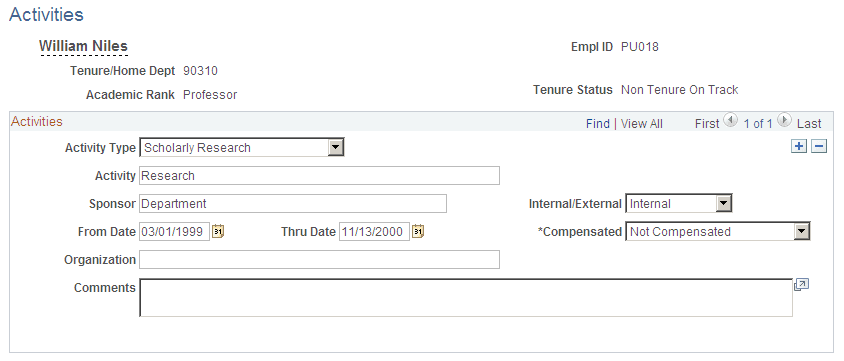
| Field or Control | Description |
|---|---|
|
Compensated |
Select Comp if the employee was compensated for the activity, or No Comp if the employee was not compensated. |
|
Organization |
Enter the name of the department or external organization where the activity took place. |
Faculty Administrative Posts Page
Use the Faculty Administrative Posts page (EG_ADMIN_POST_TBL) to set up administrative posts.
Navigation:
This example illustrates the fields and controls on the Faculty Administrative Posts page.
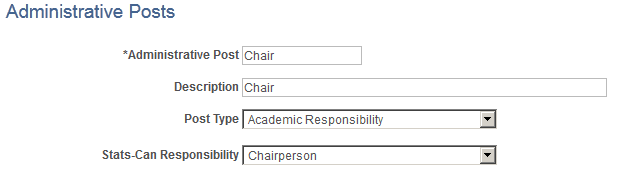
| Field or Control | Description |
|---|---|
|
Administrative Post |
Enter the name of the administrative post, appointment, or title, such as Chair. |
|
(E&G, CAN) Stats-Can Responsibility (Statistics Canada Responsibility) |
This data only appears in the Statistics Canada Academic Teaching Survey reports. Select a responsibility code. This field is for Canadian higher education degree-granting institutions only. |
Track Administrative Posts Page
Use the Track Administrative Posts page (EG_ADMIN_POSTS) to track administrative posts and appointments and titles that you do not want to track in the Job Data component.
Before using this page, set up the Faculty Events - Administrative Posts page (EG_ADMIN_POST_TBL).
Navigation:
This example illustrates the fields and controls on the Track Events - Administrative Posts page.
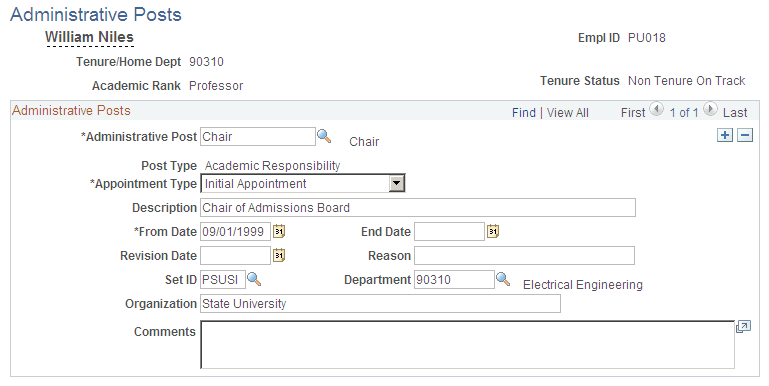
| Field or Control | Description |
|---|---|
|
Administrative Post |
Select an administrative post. |
|
Appointment Type |
Select the type of appointment. |
|
Revision Date |
Enter the date the administrative post changed. |
|
Reason |
Enter the reason the end date changed. |
|
Department |
Select the department in which the post is held. |
|
Organization |
Enter the internal or external organization in which the post was held. |
Faculty Presentations Page
Use the Faculty Presentations page (EG_PRESENTATIONS) to track information about presentations given by employees.
Navigation:
This example illustrates the fields and controls on the Faculty Presentations page.
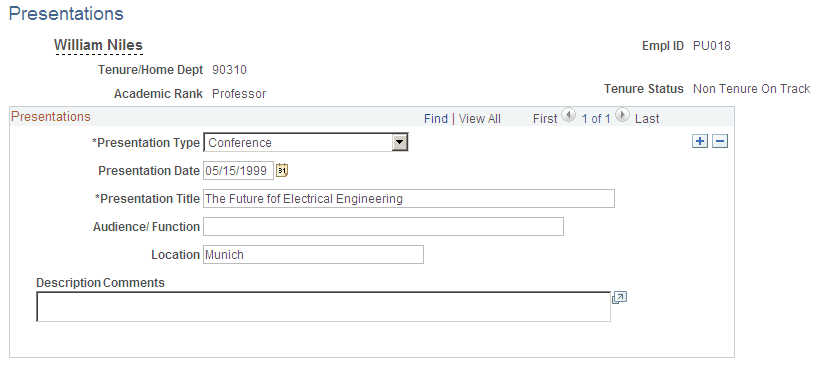
| Field or Control | Description |
|---|---|
|
Presentation Type |
Select the type of presentation the employee performed. |
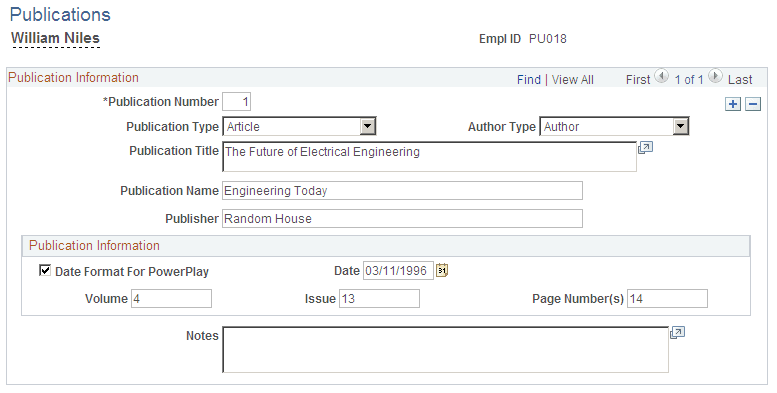
Faculty Publications Page
Use the Faculty Publications page (EG_PUBLICATIONS) to track information about the employees' published works.
Navigation:
This example illustrates the fields and controls on the Faculty Publications page.
| Field or Control | Description |
|---|---|
|
Date Format For PowerPlay and Date |
Select to enter the publication date in the format MM/DD/YYYY. Deselect this check box to enter only the year in the Date field. |
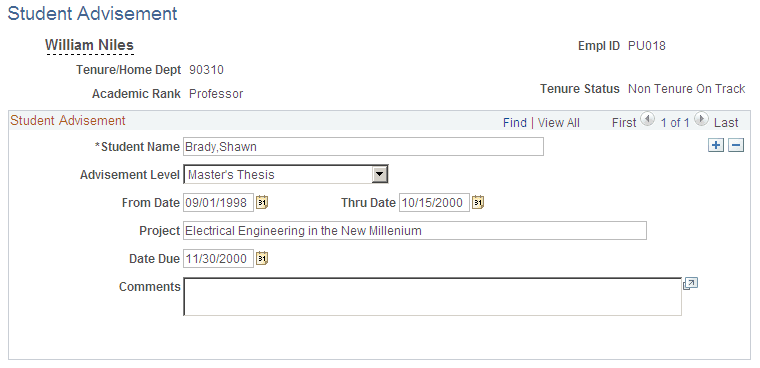
Student Advisement Activity Page
Use the Student Advisement Activity page (EG_ADVISEMENT) to track information about any advisement activities.
Navigation:
This example illustrates the fields and controls on the Student Advisement Activity page.
| Field or Control | Description |
|---|---|
|
Student Name |
Enter the student advisee's name in the following format: Last Name,First Name (no spaces). |
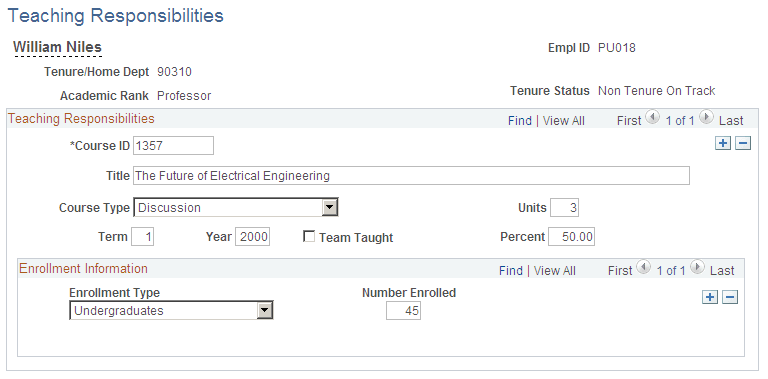
Track Teaching Responsibility Page
Use the Track Teaching Responsibility page (EG_TEACHING_RESP) to track faculty teaching responsibilities.
Navigation:
This example illustrates the fields and controls on the Track Teaching Responsibility page.
| Field or Control | Description |
|---|---|
|
Course ID (course identification) |
Enter the course ID, such as TF001 (teach). |
|
Term |
Enter the term in which the course is taught. For example, enter 2 to indicate that the course is taught in the second term. |
|
Team Taught |
Select if a team of instructors teaches the course. |
|
Percent |
Enter the percent of the course for which the employee is responsible to teach. |