Confirming Pay
Pages Used to Confirm Pay
| Page Name | Definition Name | Usage |
|---|---|---|
|
Preconfirm Audit Report Page |
RUNCTL_AUDIT |
Generate the PAY036 report which provides a detailed listing (by company, calendar year, pay group, month code, pay end date, and employee ID) of information that might cause problems during the Pay Confirmation process for the selected pay run. A pay run ID is required to run this report. |
|
RUNCTL_PAY_CONF |
Enter pay confirmation process parameters and run the Pay Confirmation process. |
Understanding Pay Confirmation Results
Review pay confirmation results using hard copy reports or the available online Review Paycheck pages in the Payroll Processing menu.
Confirm Payroll Page
Use the Confirm Payroll page (RUNCTL_PAY_CONF) to enter pay confirmation process parameters and run the Pay Confirmation process.
Navigation:
This example illustrates the fields and controls on the Confirm Payroll page.
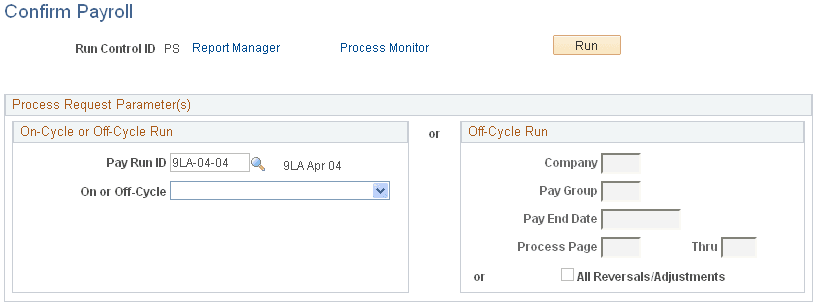
On-Cycle or Off-Cycle Run
| Field or Control | Description |
|---|---|
|
Pay Run ID |
For on-cycle confirmation, enter the pay run ID. Use the identical pay run ID in the Pay Confirmation process that you used during both the Paysheet Creation and Pay Calculation processes. |
|
On or Off-Cycle |
To confirm all off-cycle checks that are associated with a particular period, enter a pay run ID and select Off-Cycle. To confirm off-cycle checks by page range, leave the Pay Run ID field blank, select Off-Cycle, and use the Off-Cycle Run group box to specify parameters for the calculation: company, pay group, pay end date, and the page numbers. |
Off-Cycle Run
| Field or Control | Description |
|---|---|
|
All Reversals/Adjustments |
Select to process all reversals and adjustments. |