Reviewing and Adjusting ROE Balances
Pages Used to Review and Adjust ROE Balances
| Page Name | Definition Name | Usage |
|---|---|---|
|
ROE Balances Page (Record of Employment balances) |
BALANCES_UI1_CAN |
(CAN) Review an employee's ROE balances. |
|
ROE Balance Adjustments Page (Record of Employment balance adjustments) |
BALANCES_UI2_CAN |
(CAN) Review online adjustments of an employee's ROE balance. |
|
Adjust ROE Balance 1 Page (adjust Record of Employment balance 1) |
ADJ_UI_BAL1_CAN |
(CAN) Identify the wage loss plan, the EI period, and the earnings end date for both the FROM and TO records. |
|
Adjust ROE Balance 2 Page (adjust Record of Employment balance 2) |
ADJ_UI_BAL2_CAN |
(CAN) Change earnings and hours balances for the EI periods. |
Understanding ROE Balances
The system maintains EI insurable earnings and hours balances by pay period and reports those figures during the Create Mass ROE Data process. We refer to these balances as ROE balances.
The Record of Employment component enables you to process online adjustments to ROE balances. This process adjusts balances and moves or reallocates ROE balances from one period to another, from one wage loss plan to another, or a combination of both. It does not allow for the creation of new balances.
Related Topics
Adjust ROE Balance 1 Page
(CAN) Use the Adjust ROE Balance 1 (adjust Record of Employment balance 1) page (ADJ_UI_BAL1_CAN) to identify the wage loss plan, the EI period, and the earnings end date for both the FROM and TO records.
Navigation:
This example illustrates the fields and controls on the Adjust ROE Balance 1 page.
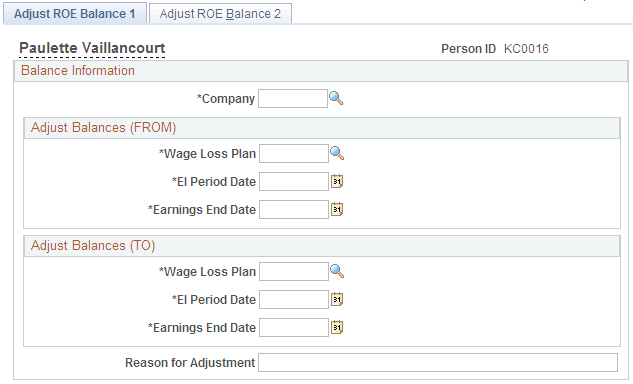
Identify the ROE balance that you want to adjust and enter an adjustment reason.
| Field or Control | Description |
|---|---|
|
Reason for Adjustment |
Text that you enter here becomes part of the adjustment record and your audit trail. |
Adjust ROE Balance 2 Page
(CAN) Use the Adjust ROE Balance 2 (adjust Record of Employment balance 2) page (ADJ_UI_BAL2_CAN) to change earnings and hours balances for the EI periods.
Navigation:
This example illustrates the fields and controls on the Adjust ROE Balance 2 page.
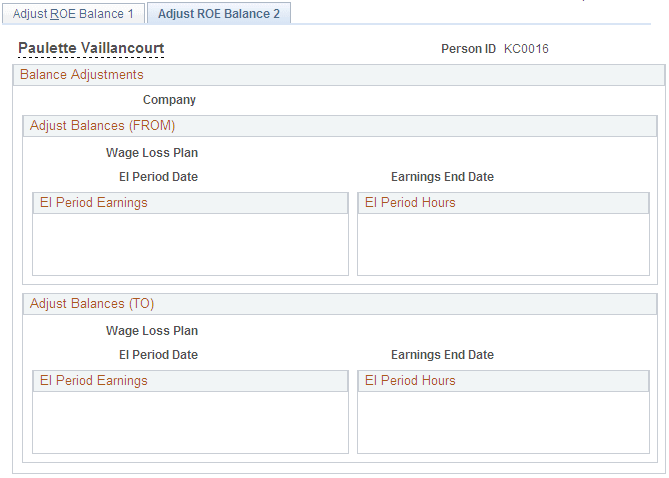
Amounts must be entered in the Adjust Balances (FROM) group box representing the source balance.
| Field or Control | Description |
|---|---|
|
EI Period Earnings (Employment Insurance period earnings), and EI Period Hours (Employment Insurance period hours) |
If you enter a new current balance, the system calculates the adjustment amount for the source balance record and the adjusted after balance amount of the target balance record. If you enter an adjustment, the system calculates the new current balance for the source balance record and the adjusted after balance amount of the target balance record. |
|
Suspend Adjustment |
Select to return to the first page to re-enter one or more of the fields. |