Setting Up Canada Payroll Savings Programs
To set up Canada Payroll Savings Programs, use the Canada Payroll Savings Org ID (CPS_ORG_ID_PNLG) and Canada Payroll Savings Table (CPS_TABLE) components.
Pages Used to Set Up Canada Payroll Savings Programs
| Page Name | Definition Name | Usage |
|---|---|---|
|
Canada Payroll Savings Org ID Page(Canada Payroll Savings organization ID) |
CPS_ORG_ID_PNL |
(CAN) Specify details about a participating organization. |
|
CPS_CAMPAIGN_DATA |
(CAN) Enter specify the parameters required to create the electronic data report file for transmission to the Bank of Canada for each campaign. |
|
|
Deduction Table - Setup Page |
DEDUCTION_TABLE1 |
(CAN) Set up CPS deduction codes. |
|
General Deduction Table Page |
GENL_DEDUCTION_TBL |
(CAN) Setup the corresponding General Deduction table entry for each CPS deduction code. |
Related Topics
Canada Payroll Savings Org ID Page
(CAN) Use the Canada Payroll Savings Org ID (Canada Payroll Savings organization ID) page (CPS_ORG_ID_PNL) to specify details about a participating organization.
Navigation:
This example illustrates the fields and controls on the Canada Payroll Savings Organization ID page.
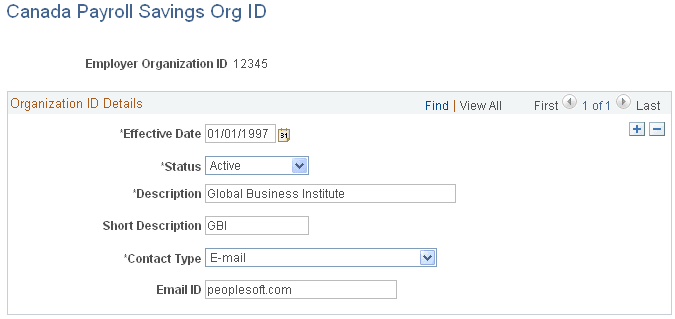
The information on this page is required to uniquely identify each employer, ensure the secure processing of the employees' contributions, and provide contact information for communications from the Bank of Canada (for example, to confirm file receipt and report the successful completion of batch processing).
Enter the employer organization ID in the entry dialog box. The Bank of Canada assigns this unique, five-digit identification number to participating employers and organizations.
| Field or Control | Description |
|---|---|
|
Contact Type |
Specify how you require file transmission confirmations from the Bank of Canada: E-mail, Fax Number, or None. |
Canada Payroll Savings Table Page
(CAN) Use the Canada Payroll Savings Table page (CPS_CAMPAIGN_DATA) to specify the parameters required to create the electronic data report file for transmission to the Bank of Canada for each campaign.
Navigation:
This example illustrates the fields and controls on the Canada Payroll Savings Table page.
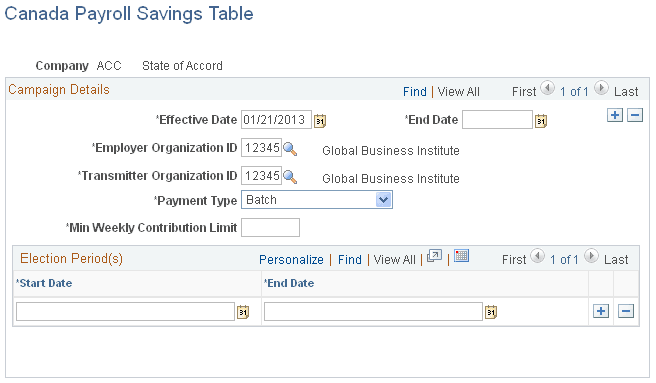
Campaign Details
| Field or Control | Description |
|---|---|
|
Effective Date |
Enter the date on which the payroll savings contribution period begins for each annual campaign. |
|
End Date |
Enter the date on which the payroll savings contribution period ends for each annual campaign. |
|
Employer Organization ID |
The ID selected here will identify the company with employees who participate in the plan, as indicated on the plan application forms. This ID will be used by the bank to update their system with purchase information. If you select Batch in the Payment Type field, the company specified here will be responsible for forwarding the contributions to the bank on behalf of their employees. |
|
Transmitter Organization ID |
The ID selected here will identify the company that processes the transmission file and transmits the file to the bank, for one or more companies. If you select Transmission in the Payment Type field, the company specified here will be responsible for forwarding the contributions to the bank for every employee in all companies included in the transmission file. |
|
Payment Type |
Select: Batch: To send individual cheques for each batch header record or participating company. Transmission: To send one cheque for the whole transmission. Note: Multiple company processing − As one transmission file will be created for each pay run ID, multiple companies sharing the same pay run ID will be reported in one transmission file. The same transmitter organization ID and payment type must be specified for every company participating in a single transmission. |
|
Min. Weekly Contribution Limit (minimum weekly contribution limit) |
Enter the minimum limit established by the Bank of Canada for employees paid on a weekly pay frequency. The system uses this value to calculate the minimum contribution limits for employees in all other pay frequencies. |
Election Period(s)
| Field or Control | Description |
|---|---|
|
Start Date and End Date |
Enter start and end dates for the campaign contribution period. These dates represent the earliest and latest dates on which the system accepts payroll savings contribution change information through the Create General Deductions page. Note: If you permit changes to employee contribution information for the entire campaign contribution period, enter the campaign effective date in the Start Date field and the campaign end date in the End Date field. You can also define multiple election periods for one campaign contribution period. |
Related Topics
Deduction Table - Setup page
(CAN) Use the Deduction Table - Setup page (DEDUCTION_TABLE1) to set up CPS deduction codes.
Navigation:
If you offer both non-Registered and Registered Retirement Savings Plan (RRSP) account types, define a separate deduction code to process contributions for each account type. You must also set up the corresponding General Deduction table entry for each deduction code.
| Field or Control | Description |
|---|---|
|
Plan Type |
Define CPS deduction codes as general deductions (plan type 00). |
|
Special Processing |
Select Bond in the Special Processing field to identify CPS deduction codes for reporting contribution information. |