Setting Up Treasury Interface TAS and BETC Requirements
Use the following Treasury Interface USF components to set up TAS and BETC requirements for PAM GWA:
-
TAS Agency Identifier (GVT_TAS_AGENCY_ID)
-
TAS Main Account (GVT_TAS_MAIN_ACCT)
-
BETC Definition (GVT_BETC)
-
TAS BETC Definition (GVT_TAS_DEFN)
Pages Used to Set Up TAS and BETC Requirements
| Page Name | Definition Name | Usage |
|---|---|---|
|
GVT_TAS_AGENCY_ID |
Enter the Agency Identifier code and description. |
|
|
GVT_TAS_MAIN_ACCT |
Enter the Main Account code and description. |
|
|
GVT_BETC |
Enter and maintain Business Event Type Codes (BETCs) used to classify transactions for Treasury reporting. |
|
|
GVT_TAS_DEFN |
Enter key values (Agency Identifier Code and Main Account) to create an agency and main account combination, define attributes (components) for funding accounts within that combination, and generate a componentized TAS for each funding account. |
|
|
GVT_TAS_DEFN_ATTR |
Enter associated fund codes and set ID for the TAS. |
Common Terms Used in Treasury Interface USF
The following U.S. Treasury acronyms and abbreviations may apply to Oracle’s PeopleSoft Treasury Interface USF components.
| Term | Definition |
|---|---|
|
BETC |
Business Event Type Code |
|
CARS |
Central Accounting Reporting System |
|
GWA |
Government Wide Accounting |
|
PAM |
Payment Application Modernization (the U.S. government initiative to consolidate many payment applications into one system) Payment Automation Manager (position in the Bureau of the Fiscal Service, U.S. Department of Treasury responsible for the initiative) |
|
SPR |
Standard Payment Request |
|
SPS |
Secure Payment System |
|
TAS |
Treasury Account Symbol |
|
TAS Component |
Treasury Account Symbol detail or attribute, the collection of which comprises a componentized TAS |
Understanding the U.S. Treasury Interface PAM GWA Requirements
Payment Application Modernization (PAM) is the U.S. Department of Treasury’s Government Wide Accounting / Central Accounting Reporting System (GWA/CARS) 2014 initiative to standardize accounting classifications and structures, and modernize and consolidate many payment applications into one system. The initiative is under PAM (Payment Automation Manager), Bureau of the Fiscal Service (formerly known as the Financial Management Service).
As part of PAM (the modernization initiative), all Federal agencies using Treasury services must submit payment data in the required standard input format as of October 1, 2014.
To comply with PAM GWA, Federal agencies are required to use valid combinations of the current Treasury Account Symbols (TAS) and Business Event Type Codes (BETC) as published by the U. S. Department of Treasury for cash transactions when entering and reporting pay transactions:
-
Treasury Account Symbols (TAS): A TAS indicator represents, by agency and bureau, individual appropriations, receipts, and other fund accounts. Agencies post appropriations or spending authorizations granted by the Congress to these accounts, and use account symbols to report to Treasury and OMB (Office of Management and Budget).
-
Business Event Type Codes (BETC): A BETC is an eight-character code used in the GWA system to indicate the type of activity being reported, such as payments, collections, borrowings, and so on. This code must accompany the account symbol (TAS) and the dollar amounts to classify the transaction against the fund balance with the Treasury.
-
TAS Components: TAS components are eight meaningful pieces of business data that combine to identify a U.S. Treasury account. The components (attributes) are joined with a Business Event Type Code (BETC) to report Federal government financial transactions. TAS components provide Federal agencies and Treasury the ability to sort, filter, and analyze data based on each independent piece of the componentized TAS. In PeopleSoft, the two key value components are the TAS Agency Identifier code and the TAS Main Account code. You must associate the other six components with the agency and main account combination, and specify at least one BETC to create a componentized TAS. PeopleSoft leverages the use of accounting fund codes associated with the componentized TAS to link the TAS to payroll activities.
For more information about the PAM GWA initiative and TAS and BETC requirements, consult the U.S. Department of Treasury’s website, which at the time of this publication was https://fiscal.treasury.gov/.
Prerequisites
Before you can set up and use the required TAS and BETC identifiers, the following prerequisites must be accomplished:
-
Ensure that the GL business unit is correctly mapped to the HR business unit on the Business Unit page (BUS_UNIT_TBL_HR).
-
Set up the corresponding Set Control ID for each GL business unit on the TableSet Control - Record Group page (SET_CNTRL_TABLE1).
-
Load or set up the Fund Codes on the CharfField Values page (DEFINE_CF_VALUES) so that each componentized TAS can be associated with a unique Fund Code.
See Application Fundamentals: Entering and Maintaining ChartField Values.
After you confirm that these prerequisites have been achieved, you can:
-
Set up a componentized TAS and BETC, as described in this topic.
-
Map TAS and BETC to payroll activities.
-
Set up PAM/SPS controls and definitions, generate and review the bulk/SPR and SPS files, and review the TAS BETC Summary report.
See Generating and Reviewing the Treasury Interface Bulk and SPS Files and Reports.
Steps for Setting Up a Componentized TAS and BETC
To set up a componentized TAS and associate BETCs as required by PAM GWA, do the following:
-
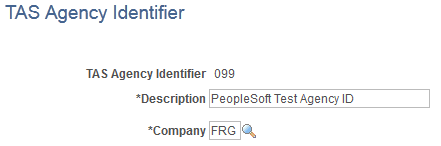
Define a unique TAS (Treasury Account Symbol) agency identifier, and associate it with one company or agency on the TAS Agency Identifier Page. You can define as many companies or agencies as you need, but each company or agency must have its own unique three-digit identifier in the range from 000 - 999.
-
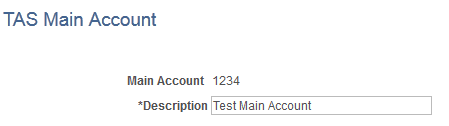
Define a unique TAS (Treasury Account Symbol) main account identifier, and associate it with a main account on the TAS Main Account Page. You can define as many main accounts as you need, but each main account must have its own unique four-digit identifier in the range from 0000 - 9999.
-
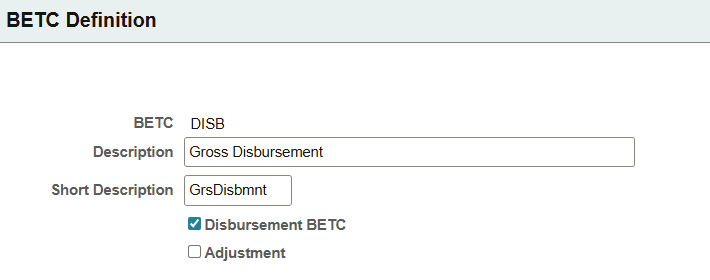
Define valid Business Event Type Codes (BETCs) on the BETC Definition Page. Use this page to enter and maintain BETC values that are used to classify transactions and are associated with componentized TAS definitions.
-
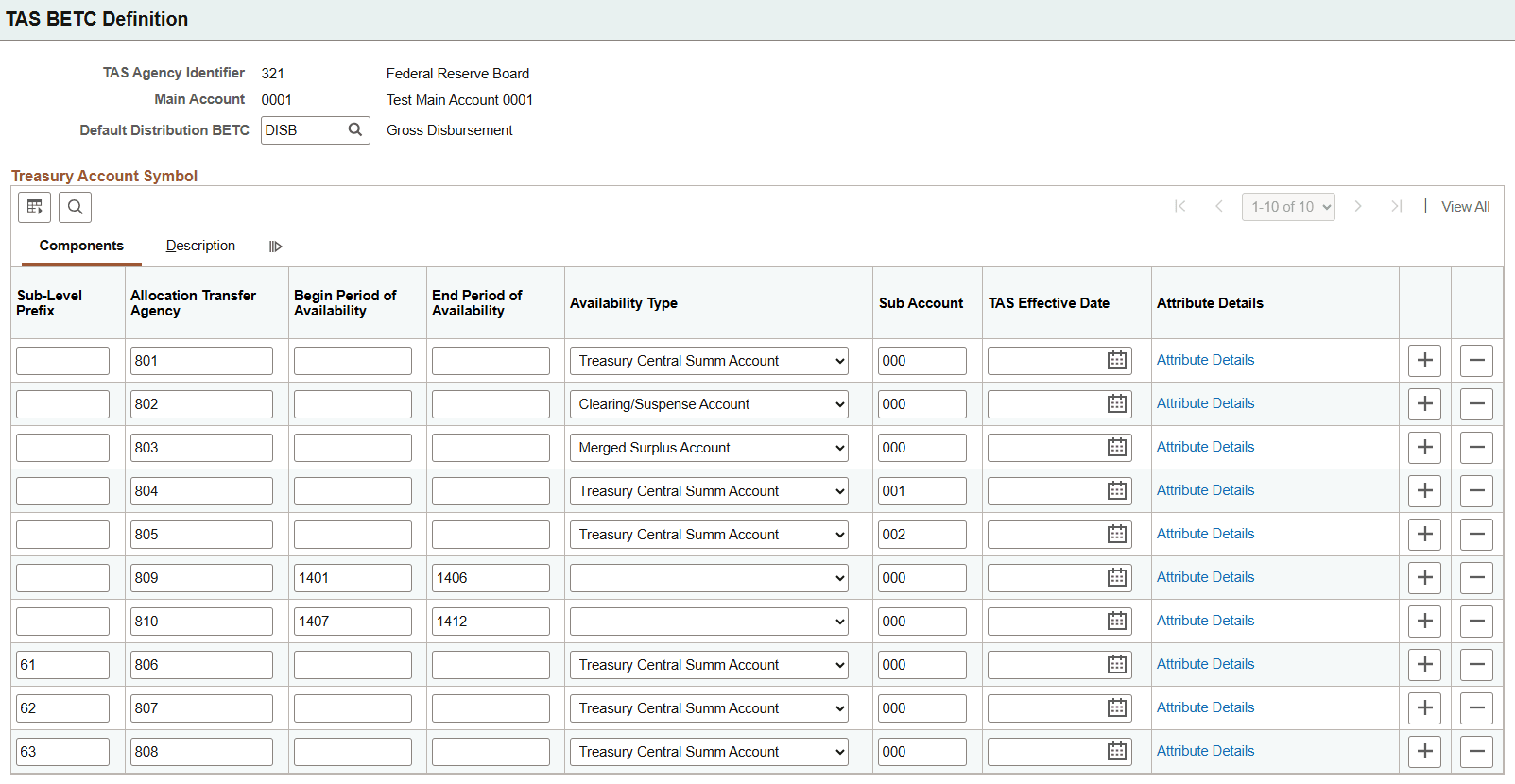
Define funding account components and generate a componentized TAS for each account in the agency and main account combination on theTAS BETC Definition Page.
-
View components and associate BETCs and funds (set ID and fund code) with the componentized TAS on the TAS Attributes Page page. You can associate as many BETCs and funds as you need, but at least one BETC and fund must be associated with each componentized TAS.
TAS Agency Identifier Page
Use the TAS Agency Identifier page (GVT_TAS_AGENCY_ID) to enter the agency identifier code and description.
Navigation:
This example illustrates the fields and controls on the TAS Agency Identifier page.
| Field or Control | Description |
|---|---|
|
Agency Identifier and Description |
Enter an agency identifier (three-digit numeric value) and description. Valid values are 000 through 999. If you enter fewer than three digits, the system supplies leading zeros. You can define as many companies or agencies as you need, but each company or agency must have its own unique three-digit identifier in the range from 000 through 999. |
TAS Main Account Page
Use the TAS Main Account page (GVT_TAS_MAIN_ACCT) to enter the Main Account code and description.
Navigation:
This example illustrates the fields and controls on the TAS Main Account page.
| Field or Control | Description |
|---|---|
|
Main Account and Description |
Enter main account identifier (four-digit numeric value) and description. Valid values are 0000 through 9999. You can define as many main accounts as you need, but each main account must have its own unique four-digit identifier in the range from 0000 through 9999. |
BETC Definition Page
Use the BETC Definition page (GVT_BETC) to define and maintain Business Event Type Codes (BETCs) for Treasury reporting.
Navigation:
| Field or Control | Description |
|---|---|
|
Disbursement BETC |
Select to indicate that this BETC represents a disbursement transaction. BETCs with the Disbursement BETC option selected and the Adjustment option cleared are available for selection as the default distribution BETC on the TAS BETC Definition page. |
|
Adjustment |
Select to indicate that this BETC represents an adjustment transaction. Adjustment BETCs are used to correct or modify previously reported transactions. |
TAS BETC Definition Page
Use the TAS BETC Definition page (GVT_TAS_DEFN) to enter key values (Agency Identifier Code and Main Account) to create an agency and main account combination, define attributes (components) for funding accounts within that combination, and generate a componentized TAS for each funding account.
Navigation:
This example illustrates the fields and controls on the TAS BETC Definition page.
| Field or Control | Description |
|---|---|
|
Default Distribution BETC |
Select the default Business Event Type Code (BETC) to associate with the componentized TAS. When adding a new TAS row, this value is automatically populated on the TAS Attributes page and used as the default disbursement BETC, unless overridden. Only BETCs with the Disbursement BETC option selected and the Adjustment option cleared on the BETC Definition page are available for selection. |
Treasury Account Symbol
| Field or Control | Description |
|---|---|
|
Sub-Level Prefix |
Enter a two-digit numeric sub-level prefix value, or leave blank if not applicable. Valid values are 00 through 99. The sub-level prefix is a programmatic breakdown of the account for Treasury publication purposes. |
|
Allocation Transfer Agency |
Enter a three-digit numeric allocation transfer agency identifier value, or leave blank if not applicable. Valid values are 000 through 999. If you enter less than three digits, the system supplies leading zeros. |
|
Begin Period of Availability and End Period of Availability |
You must enter either a begin year and end year for the period during which you want this account to be available, or you must enter an Availability Type. If you enter begin and end years, use the 4-digit year format, for example 2014. In annual and multi-year funds, begin and end year dates identify the first and last year of availability under law that an appropriation account may incur new obligations. |
|
Availability Type |
Enter an applicable availability type for this account, if begin and end years are not specified. Values include:
|
|
Sub Account |
Enter a three-digit numeric sub-account code. Valid values are 000 through 999. The sub-account code identifies an available receipt or other Treasury-defined subdivision of the main account. |
|
TAS Effective Date |
Enter the date on which the componentized TAS should become effective. Note: This field is for future use, and is not currently reported to the Treasury. |
|
Attribute Details |
Click this link to create a system-generated GWA TAS identifier code and Business Event Type Code (BETC) for this combination of details. The system redirects you to the TAS Attributes page where you can see the results and enter the appropriate fund code information. Note: You cannot save the TAS BETC Definition page without first clicking the Attribute Details link to generate the GWA TAS code. |
TAS Attributes Page
Use the TAS Attributes page (GVT_TAS_DEFN_ATTR) to view the list of components in the componentized TAS for a funding account, and associate BETCs and fund codes with the componentized TAS.
Navigation:
Click the Attribute Details link on the TAS BETC Definition page.
This example illustrates the fields and controls on the TAS Attributes page.
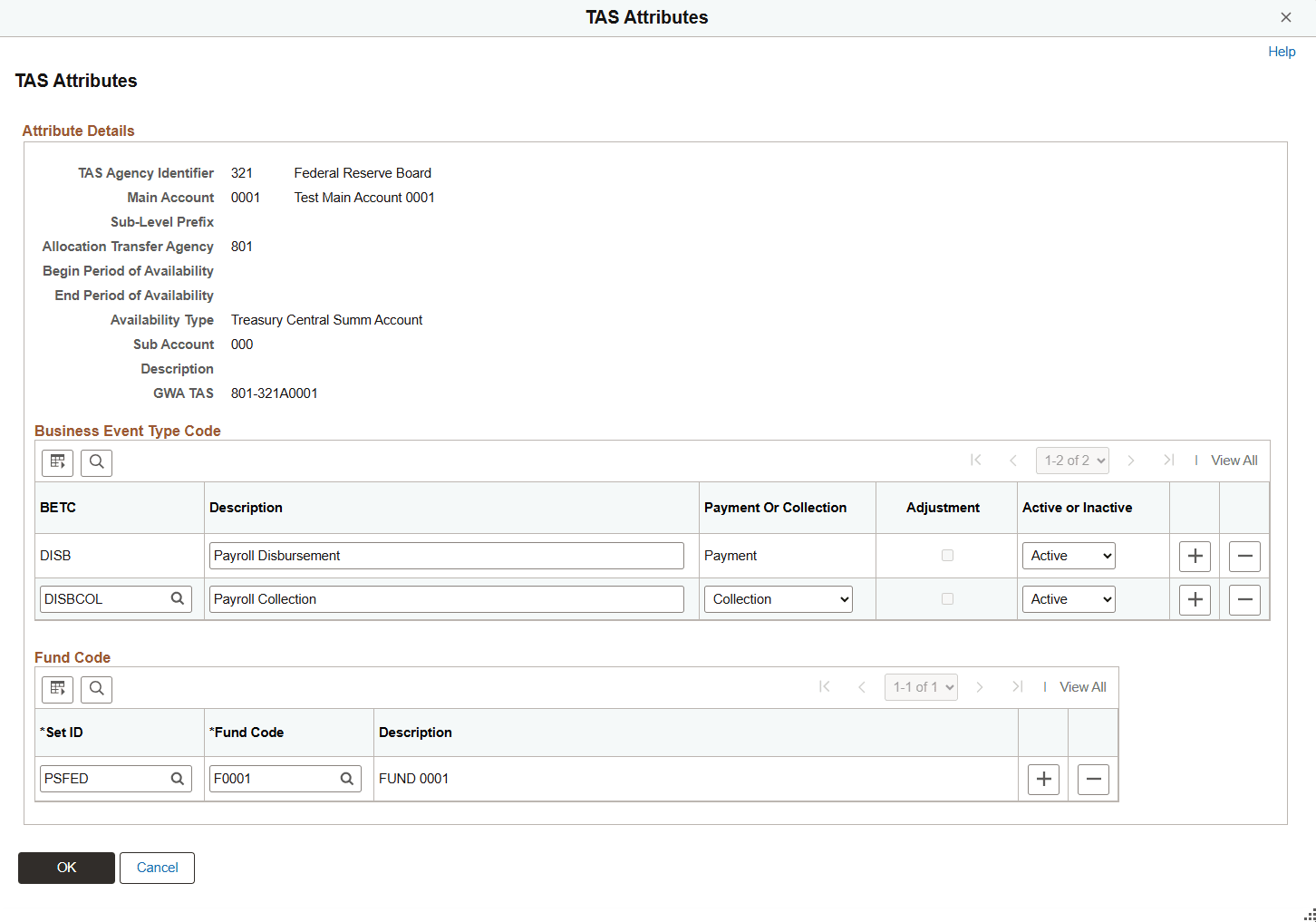
Attribute Details
The system displays the list of components that comprise the componentized TAS.
| Field or Control | Description |
|---|---|
|
GWA TAS (Government Wide Accounting Treasury Account Symbol) |
Displays the unique GWA TAS code that represents the componentized TAS. The system generates this code when you click the Attribute Details link on the TAS BETC Definition page. |
Business Event Type Code
| Field or Control | Description |
|---|---|
|
BETC (Business Event Type Code) |
Displays the BETC set up for the componentized TAS. When a new TAS row is added on the TAS BETC Definition page, the default disbursement BETC defined there is automatically populated here. You can specify additional BETCs to associate with the componentized TAS, if needed. Only BETCs defined on the BETC Definition Page are available for selection. |
Fund Code
| Field or Control | Description |
|---|---|
|
Set ID and Fund Code |
You must associate at least one fund (set ID and fund code combination) with each componentized TAS. You can link more than one fund code to each componentized TAS; however, a fund code can be related to only one componentized TAS. |