Converting Tab-Delimited Import Files
To convert tab-delimited import files, use the Convert Tab Delimiter (RUNCTL_PICNVT_TAB) component.
Pages Used to Convert Tab-Delimited Import Files
| Page Name | Definition Name | Usage |
|---|---|---|
|
RUNCTL_PICNVT_TAB |
Select the tab-delimited import file options to run the Convert Tab Delimited Files SQR Report process (PI002) to convert a tab-delimited import file. |
Convert Tab Delimiter Page
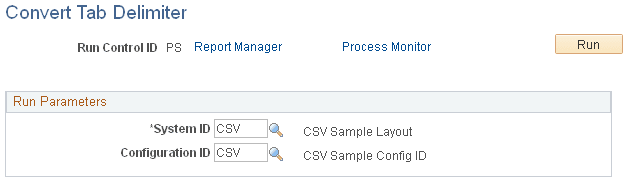
Use the Convert Tab Delimiter page (RUNCTL_PICNVT_TAB) to select the tab-delimited import file options to run the Convert Tab Delimited Files SQR Report process (PI002) to convert a tab-delimited import file.
Navigation:
This example illustrates the fields and controls on the Convert Tab Delimiter page.
Note:
Use this page to convert tab-delimited import files. Because COBOL automatically changes a tab to a space when reading a file, you must convert tab-delimited files into comma-delimited files before importing them.
| Field or Control | Description |
|---|---|
|
System ID |
Select the system ID that identifies the third-party payroll system. |
|
Configuration ID |
Select the configuration ID that identifies the import files to be converted. |