Viewing Benefit Deductions
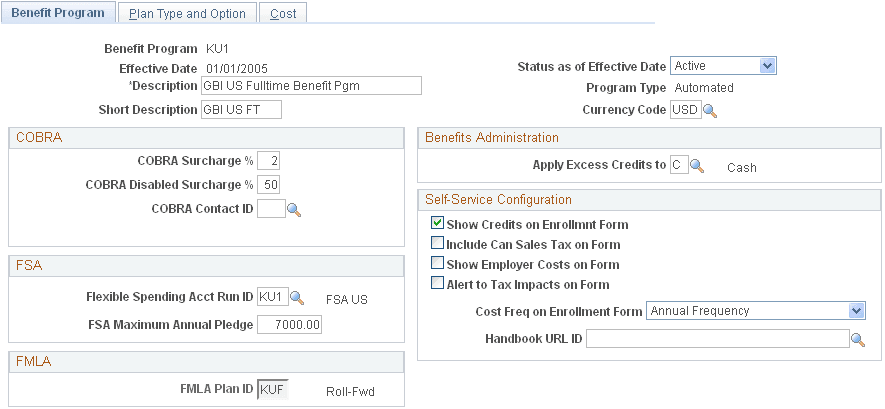
To view benefit deductions, use the Benefit Program (BEN_PROG_DEFN) component.
Pages Used to View Benefit Deductions
| Page Name | Definition Name | Usage |
|---|---|---|
|
BEN_PROG_DEFN1 |
View a benefit program. |
|
|
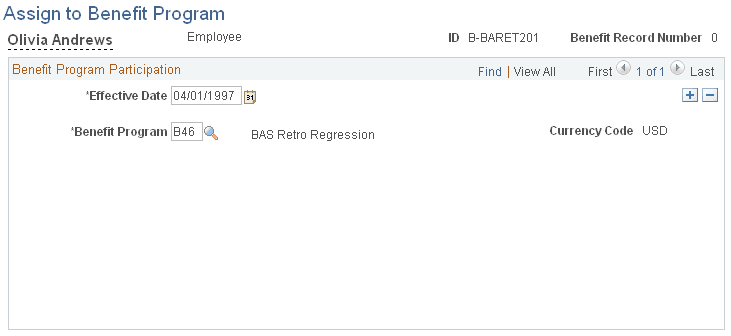
BEN_PROG_PARTICPTN |
View the benefit programs in which an employee is enrolled. |
Understanding Benefit Deductions
Benefit deductions are set up using Payroll Interface and the Manage Base Benefits business process. To set up benefit deductions:
-
Use the Deduction Table component in Payroll Interface to select the plan type (any plan type except General Deduction), enter a deduction code, and set up the deduction processing rules.
-
Use the Benefit Plan Table (BENEFIT_PLAN_TABLE) component and other components in the Manage Base Benefits business process to set up benefit plans.
See PeopleSoft Human Resources Manage Base Benefits: Defining Benefit Plans.
-
Use the Benefit Program Table component and other components in the Manage Base Benefits business process to build the benefit program and to define the deduction calculation parameters.
See PeopleSoft Human Resources Manage Base Benefits: Understanding Benefit Programs.
Benefit plans and programs are set up using the Manage Base Benefits business process; however, as a convenience, two components are duplicated in Payroll Interface: the Benefit Program component and the Assign to Benefit Program component. You can use these components as quick references when testing the interface definitions or trouble shooting deduction-related issues.
Calculating Benefit Deductions
Payroll Interface calculates pay period benefit deductions. When you run the Calculate Deductions and Deduction Confirmation processes, the calculated benefit deduction amounts are written to the export file. The third-party payroll system performs all gross-to-net-calculations.