Crediting Service Based on Hours Worked
To credit service based on hours worked, use the Service Schedule (SVCSCHD) component.
This topic discusses how to define specific service credits by hours worked.
Page Used to Credit Service Based on Hours Worked
| Page Name | Definition Name | Usage |
|---|---|---|
|
PA_TL_SVC_SCHD |
Shows the amount of service credited, based on the number of hours worked. |
Service Schedule Page
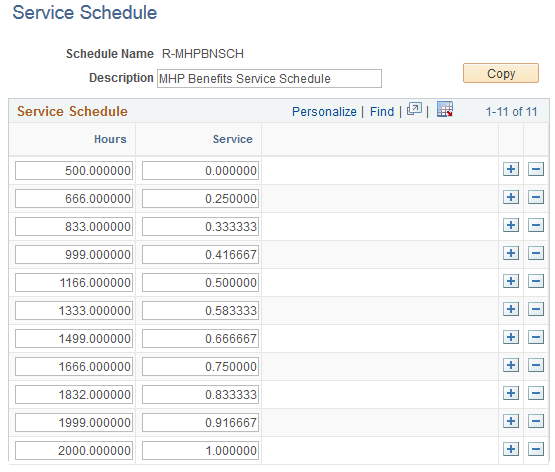
Use the Service Schedule page (PA_TL_SVC_SCHD) to shows the amount of service credited based on the number of hours worked.
Note:
If two service definitions use an identical service schedule, you may still want to create separate schedule definitions to isolate components.
Navigation:
This example illustrates the fields and controls on the Service Schedule page.
| Field or Control | Description |
|---|---|
|
Hours and Service |
Each row consists of a number of hours and the associated service credit. The system always interpolates by using the next higher value. In the example pictured, an employee with 500 hours receives no service credit, and an employee with 501 hours receives .25 credits. Note: Always set up service schedules with a zero service row. |