Reviewing Processing Results
This topic discusses how to review processing results.
Page Used to Review Processing Results
| Page Name | Definition Name | Usage |
|---|---|---|
|
PA_SUMMARY_STAT |
Review the processing results after you run a calculation. |
Review Calculations Page
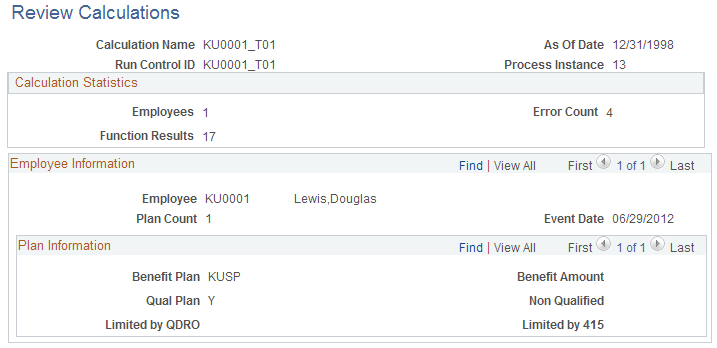
Use the Review Calculations page (PA_SUMMARY_STAT) to review the processing results after you run a calculation.
Navigation:
This example illustrates the fields and controls on the Review Calculations page.
| Field or Control | Description |
|---|---|
|
Calculation Name, Run Control ID, and Process Instance |
Identify the calculation. You must know the process instance to review messages (errors or warnings) generated during processing. |
|
As Of Date |
Displays the as of date from your calculation. |
Calculation Statistics
| Field or Control | Description |
|---|---|
|
Employees |
Displays the number of employees who are included in the calculation. |
|
Function Results |
Displays the number of function results that are processed. |
Employee Information
| Field or Control | Description |
|---|---|
|
Plan Count |
Displays the number of plans that you ran for the listed employee. |
|
Event Date |
Displays the event date from your calculation. |
Plan Information
| Field or Control | Description |
|---|---|
|
Benefit Amount |
Disregard this field. |