Viewing Calculation Messages
This topic discusses how to view calculation messages.
Page Used to View Calculation Messages
| Page Name | Definition Name | Usage |
|---|---|---|
|
PA_MESSAGE_LOG |
View warnings or errors generated during the calculation (or during periodic processing). |
Review Processing Messages Page
Use the Review Processing Messages page (PA_MESSAGE_LOG) to view warnings or errors generated during the calculation (or during periodic processing).
Navigation:
This example illustrates the fields and controls on the Review Processing Messages page.
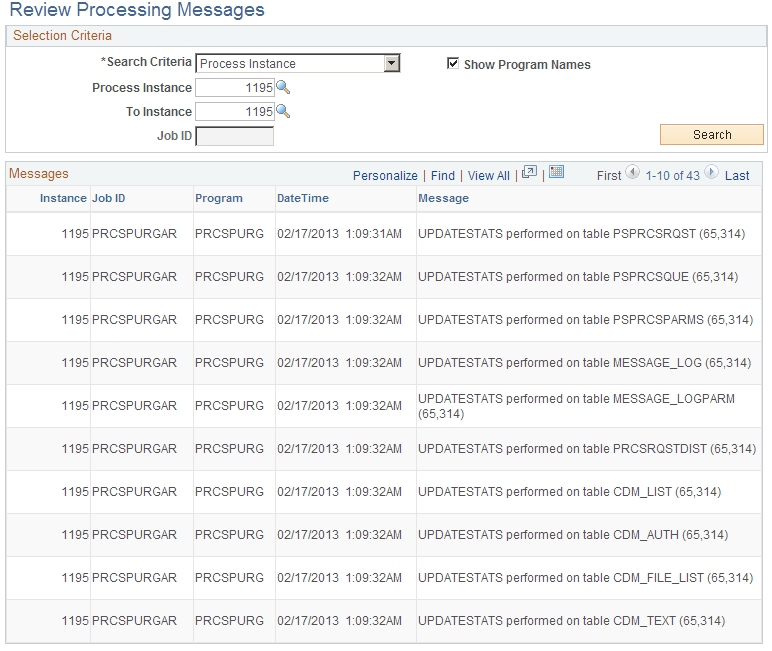
Selection Criteria
| Field or Control | Description |
|---|---|
|
Search Criteria |
To view messages from a calculation, select Instance. Look up the instance associated with a calculation on the Review Main Results page or Review Calculations page. |
|
Process Instance and To Instance |
After you find the instance, enter it in these fields. |
|
Search |
Click the Search button to display the processing errors in the Messages group box. |
|
Show Program Names |
If you select the Show Program Name check box, the program name associated with the message appears in the search results. |
Messages
| Field or Control | Description |
|---|---|
|
Instance, Job ID, and DateTime |
These fields identify where the error occurred. |
|
Program Name |
This column appears only if the Show Program Names check box in the Selection Criteria group box was selected at the time you clicked the Search button. |
|
Message |
Displays the error message. |
Related Topics