Creating Stock Agreements and Stock Legends
To create stock agreements and stock legends, use the Stock Agreement Table (STOCK_AGREEMENT) and Stock Legend Table (STOCK_LEGEND) components.
This topic provides an overview of stock agreements and stock legends and discusses how to create stock agreements and legends.
Pages Used to Create Stock Agreements and Legends
| Page Name | Definition Name | Usage |
|---|---|---|
|
STOCK_AGREEMENT |
Create an agreement ID that's included on an individual's stock agreements. |
|
|
STOCK_LEGEND |
Define stock legends for the Transfer Agent Issuance Instructions report. |
Understanding Stock Agreements and Legends
Use the Stock Agreement Table page to create an agreement ID to include with participants' stock agreements. Use the Stock Legend Table page to create boilerplate text for the Transfer Agent Issuance Instructions report. Later, for each stock plan participant, you'll enter issuance instructions and select a stock legend on the Maintain Issuance Instructions page. You use the legends to communicate instructions to a transfer or escrow agent when you issue stock to participants.
You can generate the following reports for stock agreements and legends:
-
Stock Agreement report (STSU012)
-
Stock Legend report (STSU010)
Related Topics
Stock Agreement Table Page
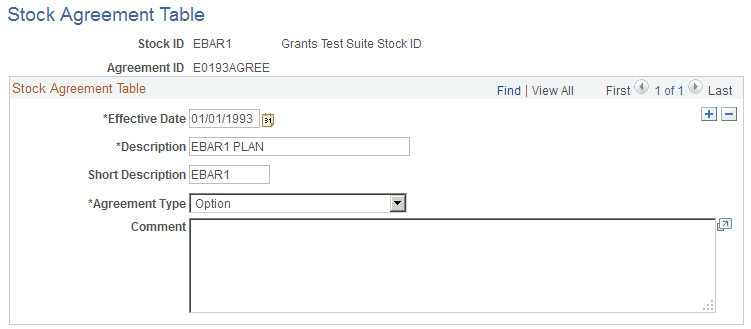
Use the Stock Agreement Table page (STOCK_AGREEMENT) to create an agreement ID that's included on an individual's stock agreements.
Navigation:
This example illustrates the Stock Agreement Table page.
| Field or Control | Description |
|---|---|
|
Agreement Type |
Select Purchase if the agreement is related to stock purchase plans, or Option if the agreement is related to option plans. |
Stock Legend Table Page
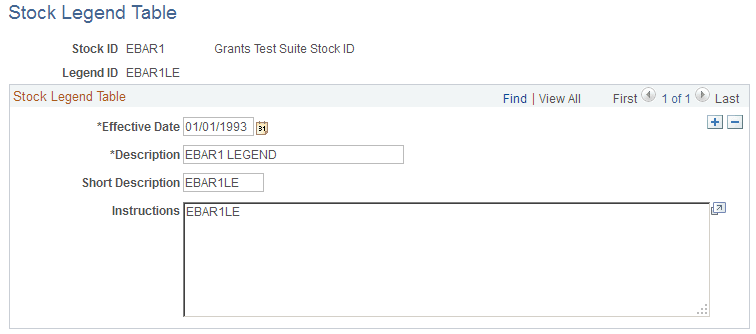
Use the Stock Legend Table page (STOCK_LEGEND) to define stock legends for the Transfer Agent Issuance Instructions report.
Navigation:
This example illustrates the Stock Legend Table page.
| Field or Control | Description |
|---|---|
|
Instructions |
Enter the legend instructions for the transfer agent. |