Defining Stock Fiscal Year Calendars
To define stock fiscal year calendars, use the Stock Fiscal Year (STOCK_FISCAL_YEAR) component. This topic discusses how to define the fiscal year calendar for a stock.
Set up fiscal year calendars if you selected Fiscal as the Year Rule on the Stock Details - Stock Options page. This rule determines how the system calculates stock option share limits.
Suppose that you have a stock option plan that limits grants to 50,000 shares per optionee in a fiscal year. At the time of a grant, the system validates that the number of shares granted does not exceed the limit for the fiscal year as defined under the Stock Details - Stock Options page and the Stock Option Plan Rules - Shares page. If the grant exceeds the share limit you receive a warning.
Generate the Stock Fiscal Year report (STSU011) to view stock fiscal year information.
Page Used to Define the Stock Fiscal Year
| Page Name | Definition Name | Usage |
|---|---|---|
|
STOCK_FISCAL_YR1 |
Define the fiscal year calendar for a stock ID. You must first define a Stock ID on the Stock Table page. |
Stock Fiscal Year Page
Use the Stock Fiscal Year page (STOCK_FISCAL_YR1) to define the fiscal year calendar for a stock ID.
You must first define a Stock ID on the Stock Table page.
Navigation:
This example illustrates the Stock Fiscal Year page.
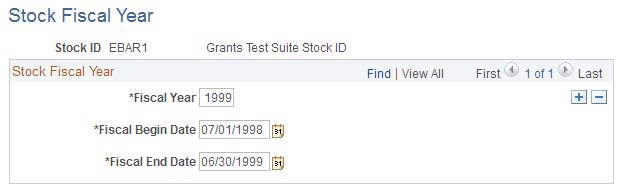
| Field or Control | Description |
|---|---|
|
Fiscal Year |
Enter the four-digit year of the fiscal year you are defining. |
|
Fiscal Begin Date |
This date should equal the previous fiscal year's end date plus one day. |