Personalize My Job Openings Page
Use the Personalize My Job Openings page (HRS_PE_OPR_MYJOBS) to set filter options to control which job openings appear on the My Job Openings pagelet.
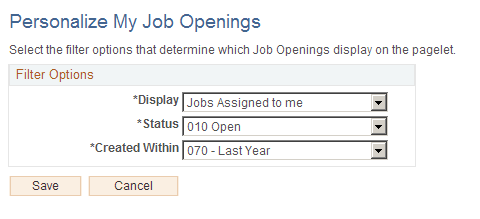
This example illustrates the Personalize My Job Openings pagelet.
| Field or Control | Description |
|---|---|
|
Display |
Select a value to filter pagelet data according to your relationship with the job opening. Jobs Associated with me are job openings that you created or where you are part of the hiring team. Jobs Assigned to me (the default value) is a subset of the jobs associated with you; it includes only job openings where you are either the primary recruiter or the primary hiring manager. The other filtering options are Jobs Created by me and All Jobs. When users are subject to enhanced applicant security, the All Jobs option would show the same jobs as the Jobs Associated with me option. Therefore, users who are subject to enhanced applicant security do not see the All Jobs option. |
|
Status |
Select a value to filter pagelet data based on the job openings status. The default value is Open. |
|
Created Within |
Select a value to filter pagelet data based on how recently the job opening was created. Options include Today Yesterday, Last 3 Days, Last Week, Last 2 Weeks, Last Month, Last Year (the default value) and View All. |