Unevaluated Answers Page
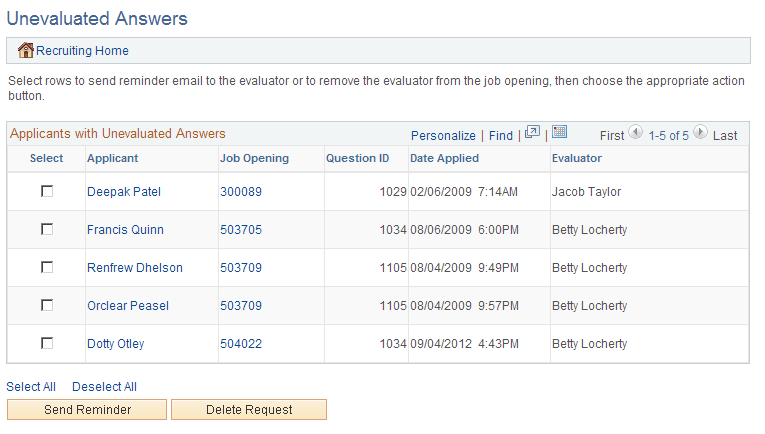
Use the Unevaluated Answers page (HRS_UNEVAL_ANS) to review a list of applicants whose answers to open-ended questions have not yet been evaluated and to send reminders to the evaluators.
Navigation:
Click the Unevaluated Answers link on the My Alerts Pagelet
This example illustrates the Unevaluated Answers page.
| Field or Control | Description |
|---|---|
|
Select |
Use the Select check box to choose which applicants to include when you click the Send Reminder or Delete Request button. |
|
Applicant |
Displays the name of the applicant whose answer has not yet been evaluated. Click this link to access the Manage Applicant page. |
|
Job Opening |
Displays the job opening with the question whose answer has not yet been evaluated. Click this link to access the Manage Job Opening page. |
|
Question ID |
Displays the unique identifier for the question whose answer has not yet been evaluated. |
|
Date Applied |
Displays the date that the applicant applied for the job opening. |
|
Evaluator |
Displays the name of the evaluator who has not yet evaluated the applicant’s answer. |
Buttons for Managing Unevaluated Answers
| Field or Control | Description |
|---|---|
|
Send Reminder |
Select the check box next to one or more of the applicants in the grid, then click the Send Reminder button to send a reminder to the evaluators who are assigned to evaluate answers for the selected applicants. |
|
Delete Request |
Select the check box next to one or more of the applicants in the grid, then click the Delete Request button to remove the selected rows from this grid. Removing rows from this grid does not change anything about the screening process; unevaluated answers are still included in screening. If there are no evaluations for the answer, then the applicant receives no points for the answer. |