My Alerts Pagelet
Use the My Alerts pagelet (HRS_PE_ALHRSTS) to view summary information for your own job openings and to access pages with more detailed information.
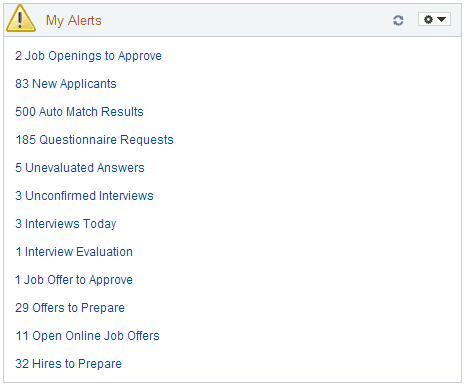
This example illustrates the My Alerts pagelet.
Note:
The alerts displayed on the My Alerts pagelet relate only to the user’s own job openings. These are job openings where the user is on the hiring team.
Personalization
| Field or Control | Description |
|---|---|
|
|
Click the Pagelet Settings icon, then select the Personalize option to access the Personalize My Alerts page, where you can choose which alerts to display and other personalizations. |

Alerts
Each alert label includes both the number and type of alerts. Clicking the alert label opens a page that lists the individual instances.
Note:
Even if the pagelet personalization settings are configured to show a particular alert, the alert does not appear if there are zero instances of the alert.
The following table lists the alerts that appear on this pagelet and explains what the number represents. The last column in the table identifies the detail page that appears if you click the alert. Many of the alerts show commonly used recruiting pages (for example, the Search Applicants page), but some detail are used only to support the My Alerts pagelet.
See Viewing Detail Pages for the My Alerts Pagelet.
| Alert Label | Description | Page Accessed |
|---|---|---|
|
<number of> Job Openings to Approve |
Displays the number of job openings waiting for the user’s approval. If approval authority is delegated to a proxy who has access to the My Alerts pagelet, the delegated transactions are included in the proxy’s count (and not the delegator's count) during the delegation period. |
Use this page to review and act on the job openings that require your approval. |
|
<number of> Job Postings |
If you use the Open Integration Framework to post jobs to third-party job boards, this alert displays the number of third-party job postings with these posting statuses: Unconfirmed Post, Unconfirmed Unpost, Awaiting Post, or Posted Error. (This is all postings other than those with the New or Unposted statuses). Note: This alert is available only for non-US Federal installations with at least one active job board vendor. |
Use this page to post, update, and unpost external job postings. |
|
<number of> New Applicants |
Displays the number of new applicants that have applied to your job openings within the number of days specified on the Personalize My Alerts page. |
Search Applicants Page: Quick Search Tab When you access the Search Applicants page from this link, it displays the applicants who have applied within the selected time frame. |
|
<number of> Auto Match Results |
Displays the number of applicants in the search results for the user’s saved Automatch searches. Search results exist only after the Run Automatch Search (HRS_AM) process has processed the automatch search. |
Use this page to view saved automatch searches and to access the associated search results. |
|
<number of> Questionnaire Requests |
Displays the number of applicants who have not yet submitted updated applications for job openings with questionnaires after being invited to do so. Only applicants who are linked to currently open job openings are included. |
Use this page to review open questionnaire requests and to send email reminders to selected applicants. |
|
<number of> Unevaluated Answers |
Displays the number of open-ended screening question evaluations that have not been completed for the user’s job openings. |
Use this page to see the applicants, job openings, and evaluators for the incomplete evaluations. |
|
<number of> Unconfirmed Interviews |
Displays the number of unconfirmed interviews where the user is an interviewer. |
Use this page to see the list of unconfirmed interviews. |
|
<number of> Interviews Today |
Displays the number of interviews scheduled for the user on that specific day. |
Use this page to review your weekly interview schedule. |
|
<number of> Interview Evaluations |
Displays the number of incomplete interview evaluations where the user is the evaluator. Two types of evaluations are included in the count:
|
Use this page to review and act on the incomplete evaluations. |
|
<number of> Job Offers to Approve |
Displays the number of job offers waiting for the user’s approval. If approval authority is delegated to a proxy who has access to the My Alerts pagelet, the delegated transactions are included in the proxy’s count (and not the delegator's count) during the delegation period. |
Use this page to review and act on the job offers that require your approval. |
|
<number of> Offers to Prepare |
Displays the number of applications that:
|
Use this page to review applicants who are waiting for offers and to access the applicant or job opening so that you can begin preparing the offer. |
|
<number of> Open Online Job Offers |
Displays the number of expired or soon-to-expire open online job offers for your job openings. The number includes offers that will expire within the number of days that you specify on the Personalize My Alerts page. Open online job offers are offers that you posted to Candidate Gateway that have not been accepted or rejected. The offer status must be Extend. |
Use this page to review the applicants and job openings associated with the open online job offers |
|
<number of> Hires to Prepare |
Displays the number of applicants with an Offer Accepted disposition for the user's job openings. |
When you access the Search Applications page from this link, it displays applications with the disposition Offer Accepted. |