Overview of Absence Integration
Absence Management and Time and Labor integration involves the ability for Absence administrators to process absence multiple times and send the absence data immediately to Time & Labor. This also allows the administrator to run multiple calendar groups at the same time. Here, the user role of Absence Administrator and Time Administrator is combined.
This diagram illustrates the Absence integration with Time and Labor for generating payable time.
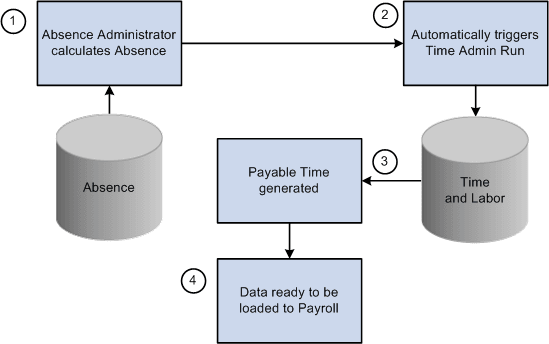
For the users with the Absence Integration feature enabled, the Time Administration process is automatically triggered to generate payable time for one or more calendar group immediately after calculating the absence. At the end of absence calculation process with in the same PS JOB (TL_GENPT), Time administration process would be triggered for the same set of employees that are part of the calendar group by considering the Time and Labor security. For more information, see the Generate Absence Payable Time Page.
Absence payable time would only be generated for the calculated absence. This ensures that only processed absence is used for rules processing.
With real time rules enabled, when timesheet user submits the timesheet, online time administration process will consider calculated absence . Calendar groups will be processed in streams for the absence calculation process from the "Generate Absence Payable time" page, if streams are enabled.
You can view the payable time results in the Timesheet component of Time and Labor. For more details, see the Timesheet Page
Note:
To enable this integration feature, you need to select the Generate Absence Payable Time checkbox in the Configurations Page. If not , the Generate Absence Payable Time page doesn’t display any absence management calendars or it’s related buttons/links.