2.14.3 Configuring the Service Target Location
To configure the service target location:
-
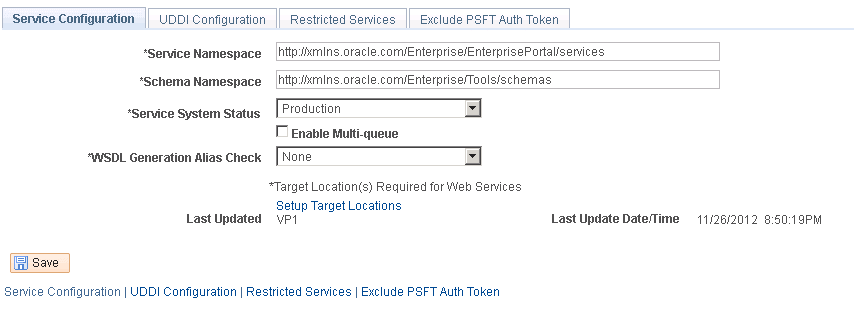
Select PeopleTools, Integration Broker, Configuration, Service Configuration.
Figure 2-13 Service Configuration Page
-
Select the Setup Target Locations link.
-
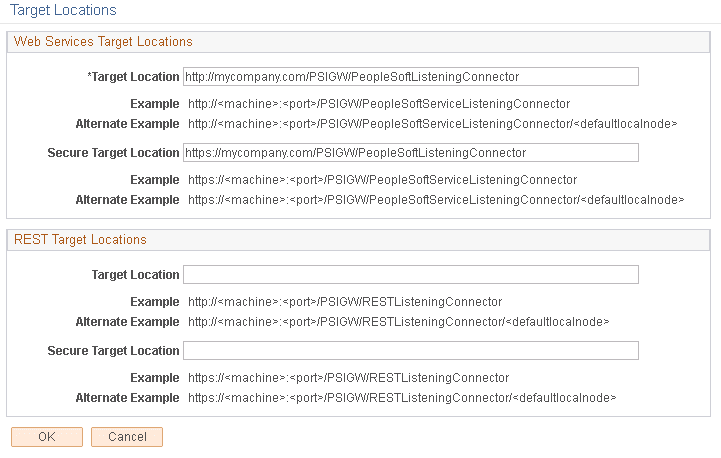
Enter the correct PeopleSoft Service Listening Connector URLs in the Target Location field and Secure Target Location field and save the changes, as shown in the example below.
Note:
The Secure Target Location is optional. However, Oracle recommends that you always set this value, because HTTP Basic Authentication is used for feed request authentication, where the user name and password will be sent to the server in clear text. When the Secure Target Location is available, all feed URLs will be generated from it.
Figure 2-14 Target Locations Page
See PeopleTools: Feed Publishing Framework, "Configuring the Integration Broker Service Target Locations."