Setting Up Target Field Default Values
This section discusses how to set up target field default values.
Page Used to Set Up Target Field Default Values
| Page Name | Definition Name | Usage |
|---|---|---|
|
EOEW_SET_DFLT_RUL |
Set target field default values that are used in the map field detail definition. |
Set Target Field Defaults Page
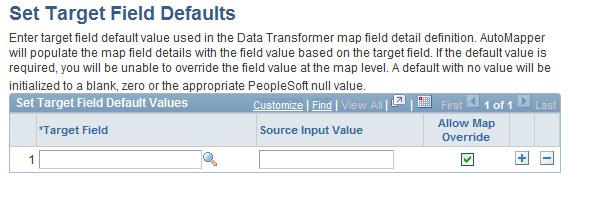
Use the Set Target Field Defaults page (EOEW_SET_DFLT_RUL) to set target field default values that are used in the map field detail definition.
Navigation:
-
-
Click the Default link on the Map Field Detail page.
This example illustrates the fields and controls on the Set Target Field Defaults page. You can find definitions for the fields and controls later on this page.
| Field or Control | Description |
|---|---|
|
Target Field |
Select the target field for which you want to define defaults. |
|
Source Input Value |
Enter the default value for the associated target field. Note: This field is free text, so you must consider the target field data type format. |
|
Allow Map Override |
Select to allow the field value to be overridden at the map level, otherwise the row will be protected. |