Setting Up Activity Guides
To fully utilize the benefits of the Activity Guide Composer, you will want to perform the following tasks to support your activity guide needs:
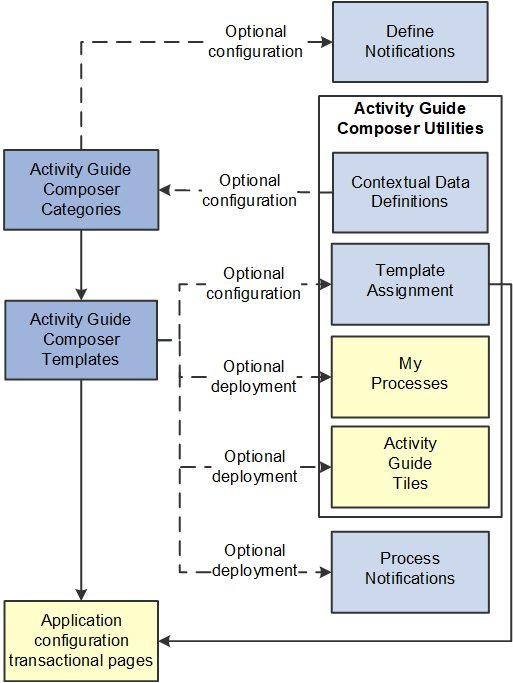
-
Set up Activity Guide Categories using the Categories (AGC_CAT_TBL) component.
Categories contain the technical configuration managed by technical resources and consist of one time technical setup. Here you will define the context records and fields, actions the user may take, images the activity guide may display in the fluid sub banner, and the steps that may be pulled into a template.
For more information, see the Setting Up Activity Guide Categories topic.
-
Create Activity Guide Templates using the Templates (AGC_TMPL_SRCH_FL) component.
Activity guide templates are created and managed by template administrators—functional personnel who are very familiar with your organization's HR transaction processes. Using this component, administrators will create and maintain activity guide templates using the data established in the activity guide category. They can also clone existing activity guided templates that can then be reconfigured for a different business process.
For more information, see the Managing Activity Guide Templates topic.
-
(Optional) Define notifications using the Define Notifications (AGC_CAT_NOTIF_TBL) component.
Notifications define push or email content that is sent to assignees when a template is configured to notify participants that an activity guide process needs their attention. If you enable notifications for your templates, use Process Notifications to sent activity guide notifications to your assignees. For more information, see the Working with Activity Guide Notifications topic.
Note:
Oracle PeopleSoft delivers Notification Composer framework to manage the setup and administration of all notifications in one central location. Once you have adopted the Notification Composer feature, you must use it to create new notifications and manage your existing notifications. For more information about Notification Composer, see Understanding Notification Composer.
-
(Optional) Define Contextual Data for a Category using the Contextual Data (AGC_CTXDTA_TBL) component.
Contextual data is data that can be derived from the context data defined for an activity guide category. The derived contextual data can be utilized in the sub banner of the fluid activity guide, in page text, or in a date field to configure the start and due date for a step.
Note:
This setup is optional. However, if you choose to use contextual data in your categories and templates, this step should be completed prior to setting up your categories.
For more information, see the Setting Up Activity Guide Utilities for Contextual Data topic.
-
(Optional) Configure the following Activity Guide Utilities tables and define rules to assign templates to your workers using Template Assignment:
-
Search Key Source Tables (AGC_SRCHREC_TBL):
View the criteria fields that retrieve data from the source table.
-
Search Key (AGC_SRCHKEY_TBL)
Identity source tables and fields to be used in the search keys prompt configuration when you define a Template Assignment definition.
-
Template Assignment (AGC_TMA_TBL)
Determine the search keys and values that will be used to determine which template the system should assign to a worker.
-
Test Template Assignment (AGC_TMA_TEST)
Test to validate that a template assignment is set up correctly.
The PeopleSoft features, such as HCM OnBoarding, take advantage of this functionality by enabling you to select to have the system assign templates to individuals based on the rules you configured using these Template Assignment tables.
For more information on setting up template assignment rules, see the Setting Up Activity Guide Utilities for Template Assignment topic.
-
-
(Optional) Deploy activity guides or create tiles from which individuals can access activity guides using the My Processes (AGC_MYAG_FL) or Activity Guide Tiles (AGC_TILE_TBL) components.
For more information, see the Deploying and Managing Activity Guide Processes topic.