Publishing Effective-Dated Rows and Prior-Dated Rows from the Delay Table
This section provides an overview of publishing effective-dated rows and prior-dated rows from the Delay table, and discusses how to run the Effective Date and Prior Publish utility.
Page Used to Publish Effective-Dated Rows and Prior-Dated Rows from the Delay Table
| Page Name | Definition Name | Usage |
|---|---|---|
|
EO_EFFPRIORPUB |
Run the Effective Date and Prior Publish utility. |
Understanding Publishing Effective-Dated Rows and Prior-Dated Rows from the Delay Table
Publishing effective-dated rows and prior-dated rows from the delay table is similar to publishing effective-dated rows. The difference is that in addition to publishing messages with a specified effective date or date range, the system also publishes all prior-dated rows with non-key changes.
Related Topics
Effective Date Prior Publish Page
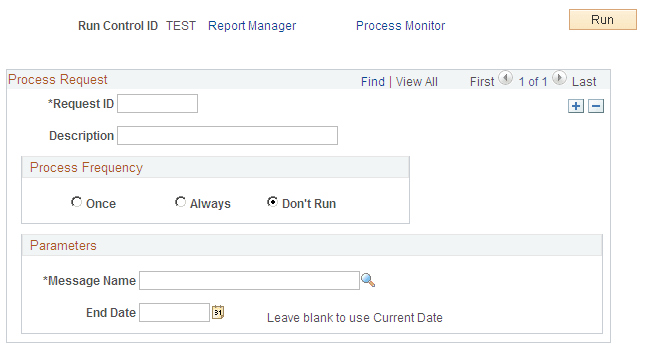
Use the Effective Date Prior Publish page (EO_EFFPRIORPUB) to run the Effective Date and Prior Publish utility.
Navigation:
This example illustrates the fields and controls on the Effective Date Prior Publish page. You can find definitions for the fields and controls later on this page.
| Field or Control | Description |
|---|---|
|
Message Name |
Select the current incremental message to publish. |
|
End Date |
Select the highest effective date to process from the delay table. |
|
Run |
Click to run this request. |