Defining General Data Cube Properties
To define general data cube properties:
-
Select to access PeopleSoft Application Designer.
-
After signing in to the PeopleSoft Application Designer, open an analytic model definition.
-
Select the data cube whose properties you want to define, and then select the General tab.
This is an example of the General tab in PeopleSoft Application Designer–Analytic Model.
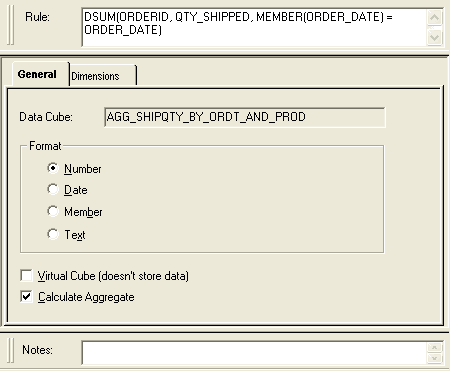
| Field or Control | Description |
|---|---|
|
Data Cube |
Displays the name of the data cube. |
|
Format |
Number: Select to format the data cube's values as numbers. Date: Select to format the data cube's values as a date in the format YYYY-MM-DD. For example, 2004/03/18 for March 18, 2004. Note: Although the values are saved in the database using this date format, end users can use My Personalizations to select a different display format in PeopleSoft Pure Internet Architecture. Member: Select to format the data cube's values as members of a specified dimension, as part of creating an association data cube. When you select the Member check box, the Dimension drop-down list box appears. Select a dimension for which you want to format the data cube's values as members. For example, you can format a CUSTOMER_ID data cube as a member of the CUSTID dimension. Note: In the analytic grid, data cubes formatted as members should have a field type of Edit Box. Text: Select to format the data cube's values as text. This option is useful for entering names, addresses, and other textual data. |
|
Virtual Cube (doesn't store data) |
Select to set the data cube as a virtual data cube. Clear to set the data cube as a nonvirtual data cube. See Virtual Data Cubes. Note: A virtual data cube must contain a formula. Selecting this option without entering and accepting a formula for a virtual data cube results in an invalid analytic model. |
|
Calculate Aggregate |
Select to enable calculation of the data cube's aggregates. Note: If Calculate Aggregate is selected for the data cube, the analytic calculation engine initially retrieves the aggregate data from the aggregate record when the analytic instance is loaded, but overwrites this data upon recalculation. If this check box is cleared, values from the aggregate record still load when the analytic instance is loaded; however, these values are not recalculated. Clear this check box to disable calculation of all of the data cube's aggregates, regardless of specified overrides. Note: Disabling aggregate calculation for data cubes disables all aggregate calculations, including the default sum aggregation. |