Finding Definition References
Before making significant changes, such as deleting a definition or modifying a definition, you must see what other parts of the application might be affected by the change. The Find Definition References feature enables you to assess the impact of a potential change to a definition, by performing a comprehensive search of the database pinpointing all definitions in which the definition in focus is located.
Note:
Although a project keeps track of your definitions, the definitions are not actually embedded in the project.
Note:
The distinction between related definitions and referenced definitions is significant. A related definition is one that is used by the current definition. A referenced definition is one that uses the current definition. For example, in the case of a record definition, fields in the record are related definitions. The records that use the fields are its definition references.
Using the Find Definition References Feature
This example illustrates how to find definition references.
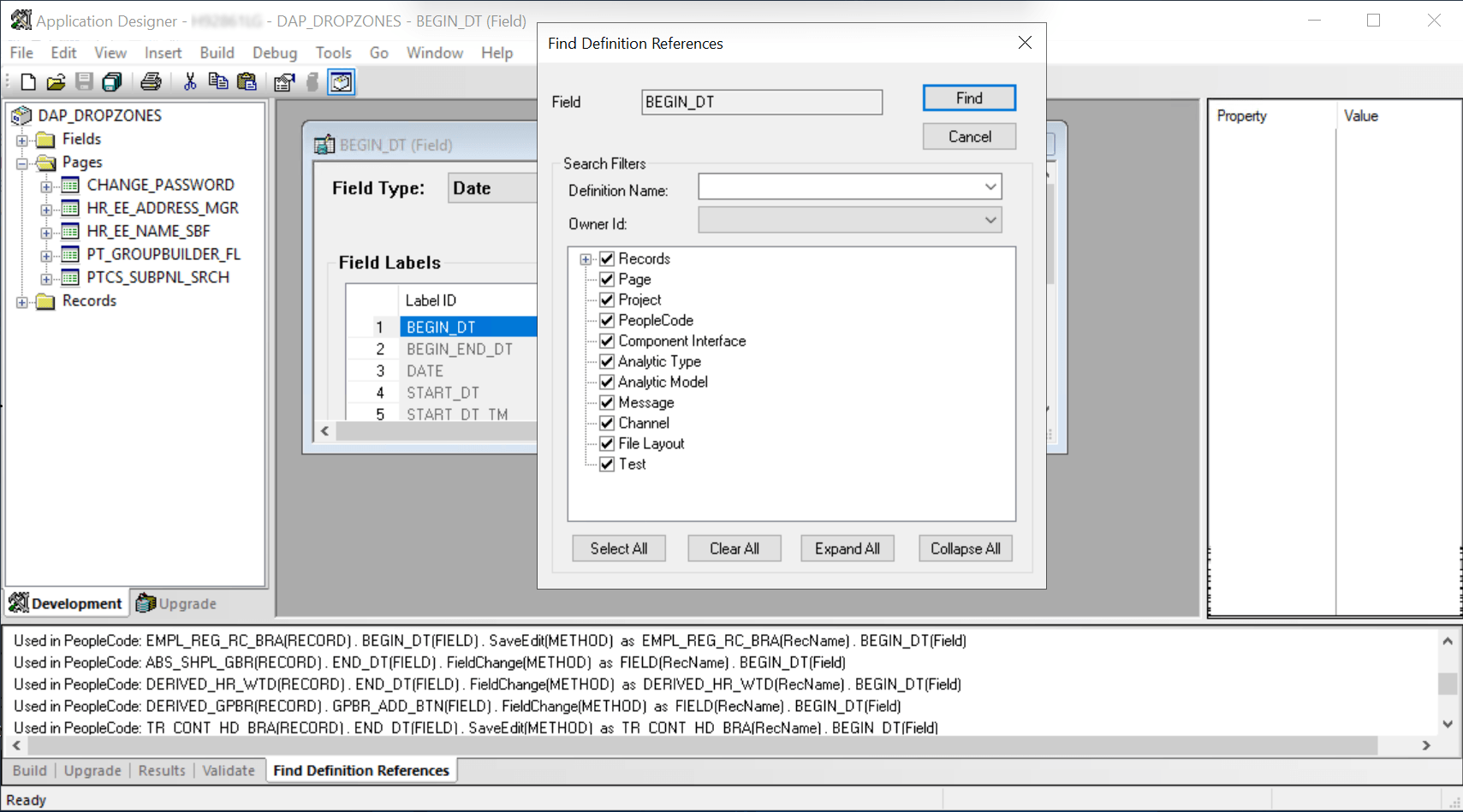
To find definition references:
-
Open the definition in the definition workspace.
-
Select or right-click the definition and select Find Definition References from the pop-up menu.
After you select this item, a search of the database takes place, and the results appear on the Find Definition References tab of the output window.
-
For Records, fields, record fields, and field labels, select any filtering options from the Find Definitions References dialog box.
See the following sections for information on filtering search results for these definition types.
-
Select any definition that appears in the output window by double-clicking it.
The selected definition opens in the definition workspace.
-
After you find a definition, select the definition reference and right-click to view the pop-up menu.
Note:
Double-clicking an entry in the Find Definition References output window opens the appropriate mode of PeopleSoft Application Designer. If you double-click a related record that was found, the record opens and the field for which you were looking is highlighted.
Common Controls for Find Definition References Filtering
When you select Find Definition References for a record, field, record field, or field label, the Find Definition References dialog box appears, providing additional options for filtering and refining the definitions in which you want to search for references. The following sections describe the options and usage.
| Field or Control | Description |
|---|---|
|
Definition Name |
To filter search results by a definition name, enter the definition name or partial definition name. |
|
Owner ID |
To filter search results by a specific owner ID, select the owner ID from the drop-down list. |
|
Select All |
Select all definition types in the definition filter tree. |
|
Clear All |
Clear all definition type selections in the definition filter tree. |
|
Expand All |
Expand all applicable definition type nodes in the definition filter tree. |
|
Collapse All |
Collapse all applicable definition type nodes in the definition filter tree. |
Using the Find Definition References Feature for Fields
This example illustrates the Find Definition References dialog for fields displaying the options to select for narrowing the scope of the search.
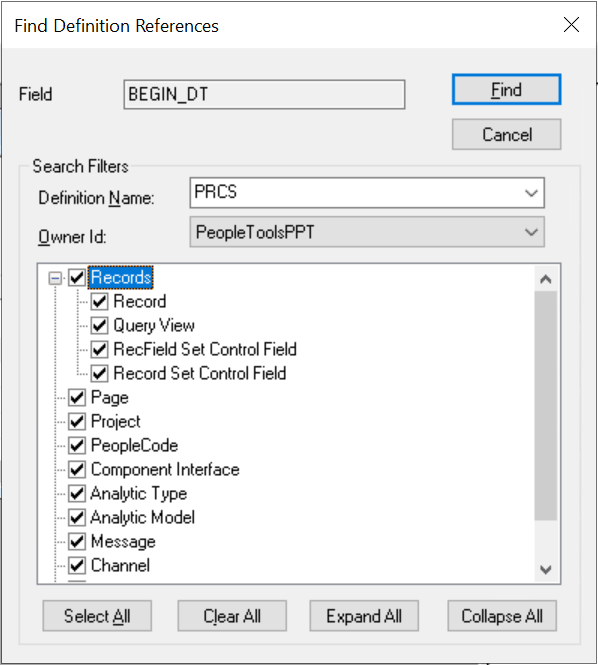
When you select Find Definition References for a field definition, the Find Definition References dialog box displays a set of options for filtering the definition types searched. For example, if you select to search only in Records (all types listed) and Page only references in record and page definition types will appear in the output window, enabling you to find the applicable references quicker.
For fields, you can select to search for references in these definition types:
-
Records
-
Record
-
Query View
-
RecField Set Control Field
-
Record Set Control Field
-
-
Page
-
Project
-
PeopleCode
-
Component Interface
-
Analytic Type
-
Analytic Model
-
Message
-
Channel
-
File Layout
-
Test
Using the Find Definition References Feature for Records
This example illustrates the Find Definition References dialog for records displaying the options to select for narrowing the scope of the search.
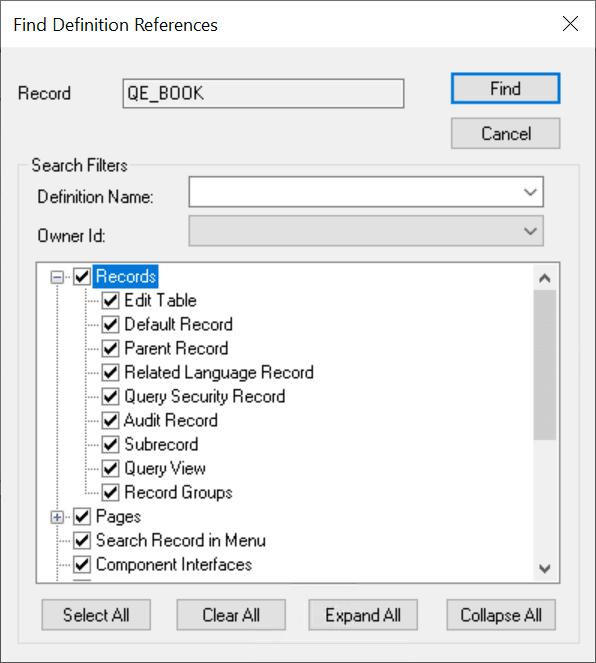
When you select Find Definition References for a record definition, the Find Definition References dialog box displays a set of options for filtering the definition types searched. For example, if you select to search only in Records (all types listed) and Pages (all types listed) only references in record and page definition types will appear in the output window, enabling you to find the applicable references quicker.
For records, you can select to search for references in these definition types:
-
Records
-
Edit Table
-
Default Record
-
Parent Record
-
Related Language Record
-
Query Security Record
-
Audit Record
-
Sub record
-
Query View
-
Record Groups
-
-
Pages
-
Panel
-
Tree Control Panel
-
Search Record in Panel Group
-
Add Search Record in Panel Group
-
Tree
-
-
Search Record in Menu
-
Component Interfaces
-
Project
-
Virtual Approver
-
Application Engine
-
State records
-
Temp records
-
-
Problem Type Definition
-
Business Process Designer
-
PeopleCode
-
Messaging
-
File Layouts
-
Analytic Model
-
Test Framework
Using the Find Definition References Feature for Record Fields
This example illustrates the Find Definition References dialog for record fields displaying the options to select for narrowing the scope of the search.
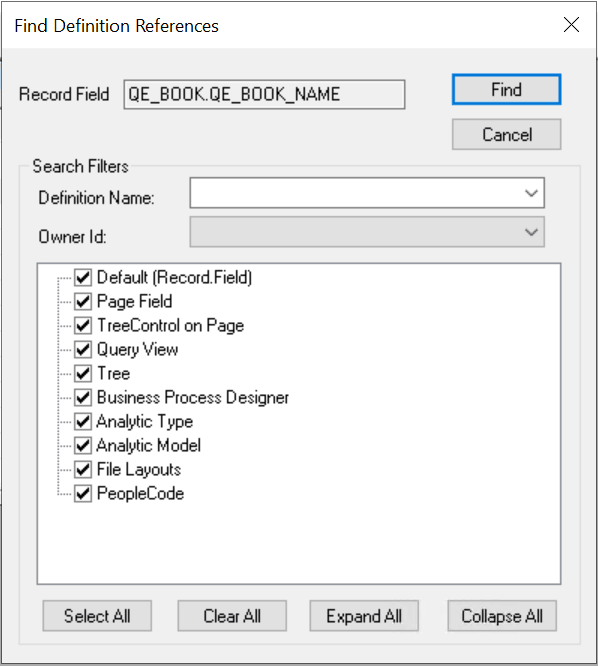
For record fields, you can filter your search by:
-
Record Field (default)
-
Panel Field (page field)
-
Tree Control on Panel (page)
-
Query View
-
Tree
-
Business Process Designer
-
Analytic Type
-
Analytic Model
-
File Layouts
-
PeopleCode
Using the Find Definition References Feature for Field Labels
This example illustrates the Find Definition References dialog for field labels displaying the options to select for narrowing the scope of the search.
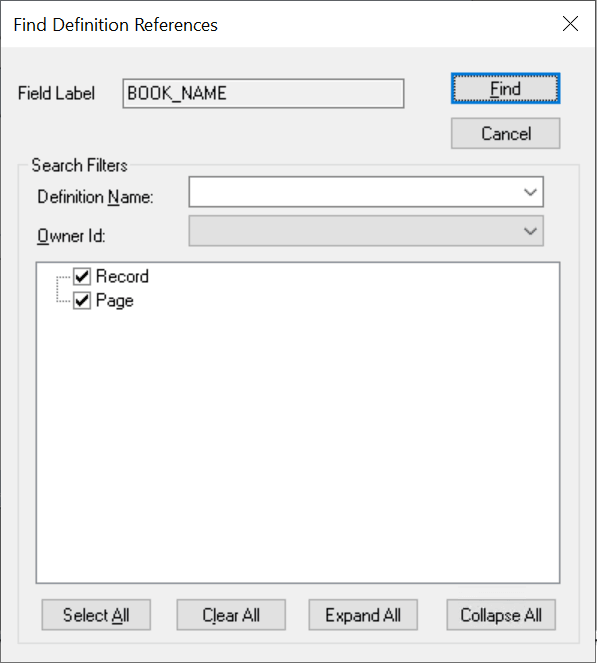
For field labels, you can filter your search by:
-
Record
-
Panel (page definitions)
Related Topics