Specifying File Record Properties
The File Layout Segment Properties dialog box contains information that is stored at the file record level:
This example illustrates the fields and controls on the File Layout Segment Properties dialog box: Use tab. You can find definitions for the fields and controls later on this page.
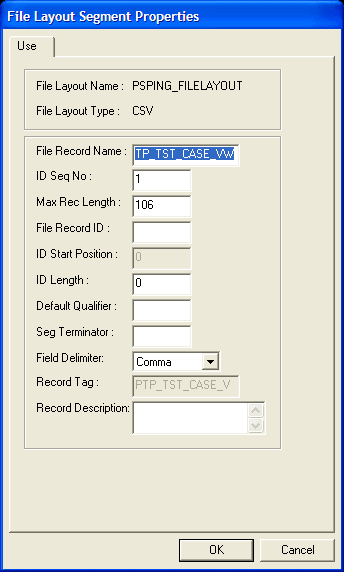
Access the dialog box using one of the following methods:
-
Double-click the file record node.
-
Right-click the file record node and select Selected Node Properties.
| Field or Control | Description |
|---|---|
|
File Record Name |
Enter a file record name that is associated with this file record. This name is used to access the file record from PeopleCode. Every file record in a file layout must have a unique name. |
|
ID Seq No. (CSV) (identification sequence number) |
Enter a sequence number for the field that contains the file record ID. |
|
Max Rec Length (maximum record length) |
Displays the default maximum length of the combined field sizes of the record. This value is automatically updated. Warning! Any inbound or outbound data is truncated beyond this value. |
|
File Record ID |
Enter a number that uniquely identifies the file record in the file layout. You can use this number for processing the file. This number is automatically written to the file if you use the WriteRecord or WriteRowset methods and if the file type is FIXED or CSV. |
|
ID Start Position (FIXED) |
Enter the column or starting position in the file record where the file record ID starts. |
|
ID Length (FIXED, CSV) |
Displays the length of the file record ID. This number is automatically generated when you enter the file record ID. Note: Do not edit this value directly. |
|
Default Qualifier (CSV) |
Enter a qualifier that is used for the file record ID and as the default for fields when no field qualifier is specified. This value overrides the definition qualifier that is specified in the File Layout Definition Properties dialog box. When you first create a file layout, this property is blank. |
|
Seg Terminator (FIXED, CSV) (segment terminator) |
Enter characters to be placed at the end of each segment when the layout is written to a file. Note: The segment terminator of a file record isnot the same as its record terminator. The segment terminator occurs immediately after a single row of data; it is defined only at design time in the File Layout Designer. The record terminator occurs immediately after the segment terminator; it is defined only at runtime by the SetRecTerminator method of the File class. See PeopleCode API Reference: SetRecTerminator method: File class for more information on the SetRecTerminator method. |
|
Field Delimiter (CSV) |
Enter a delimiter that is used for all fields in the file record. This value overwrites the definition delimiter that is specified on the File Layout Definition Properties dialog box. |
|
Record Tag (XML) |
Enter an XML tag name for this file record. The default value is the file record name. Note: Within a particular file layout, each record name and record tag must be unique. |
|
Record Description |
Enter a description of the record for documentation purposes only. |