Specifying Temporary Tables
Select the Temp Tables tab.
This example illustrates the fields and controls on the Program Properties dialog box: Temp Tables tab. You can find definitions for the fields and controls later on this page.
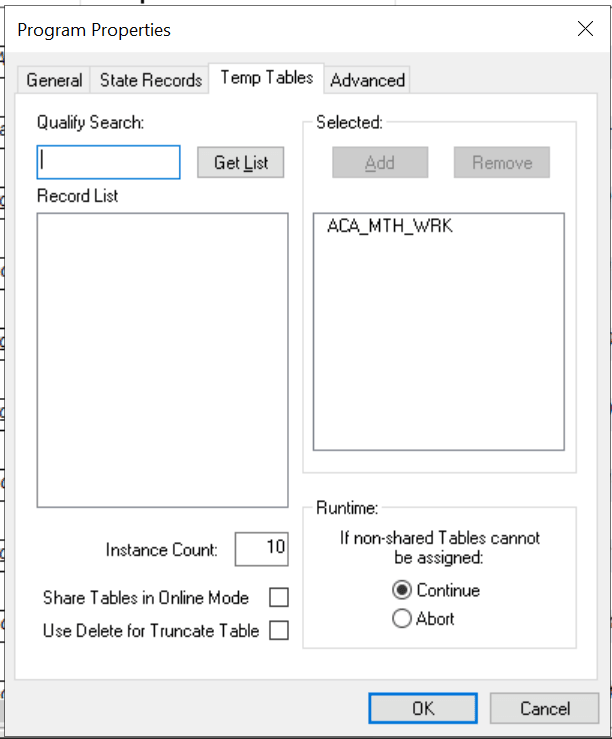
Temporary tables store intermediate results during a program run.
Note:
You must have defined required temporary tables in your database before you can associate them with an Application Engine program.
| Field or Control | Description |
|---|---|
|
Qualify Search |
Enter any wildcard characters or complete table names to limit the results that appear in the record list. By default, the Record List text box contains only records that are of type Temporary Table. You apply this attribute when you create the record in Application Designer. |
|
Get List |
Click to populate the Record List text box. |
|
Record List |
This text box contains the results of your search for temporary tables. |
|
Selected |
Select temporary tables for use with a particular program. Click Add to include selected records that appear in the record list. ClickRemove to exclude selected records that appear in the selected list. |
|
Instance Count |
Enter the number of physical tables to be created for each dedicated table for this program during the SQL Build procedure in Application Designer. Typically, you would set this number to equal the maximum number of parallel program runs that you anticipate. For instance, if you expect up to five instances of the same program to run simultaneously, then you would set the instance count to 5. |
|
Share Tables in Online Mode |
Select to enable online temporary table sharing. By default, this check box is not selected. If the temporary tables need to be shared for this particular Application Engine program when run in online mode, this has to be selected. When an online Application Engine instance cannot allocate itself a dedicated temporary table, this instance will share a temporary table already used by another instance(s), improving the online performance. |
|
Use Delete for Truncate Table |
Select to delete the temporary table during allocation of the Application Engine process. By default, this check box is not selected. Use Delete for Truncate table improves the performance of Application Engine process. |
|
Insert Selected list into Project |
If the active Application Engine program definition belongs to a project, select this check box to include the dedicated temporary tables for this program within the same project. |
|
Runtime |
Control how an Application Engine program acts if an instance of its specified dedicated temporary tables is not available. If you select Continue, then Application Engine uses the base version, or undedicated version, of the temporary tables. If you selectAbort, then the program exits with an error message. |
Note:
If the table is keyed by PROCESS_INSTANCE and the application SQL includes the process instance in the Where clause, then multiple processes can share the table. The best performance, however, occurs when a program runs against a dedicated temporary table instance.
Related Topics