Sending Ad Hoc Notifications Using Notification Configuration
You can also send notifications from many classic components by using the Notify toolbar button. The classic Notify option opens a fluid Notify page by default. The Notify feature is based on the notification configuration framework and supports three types of notifications:
-
In-App (the Notifications panel)
-
Email
-
Text
You can use the Notify option to send notifications to other users.
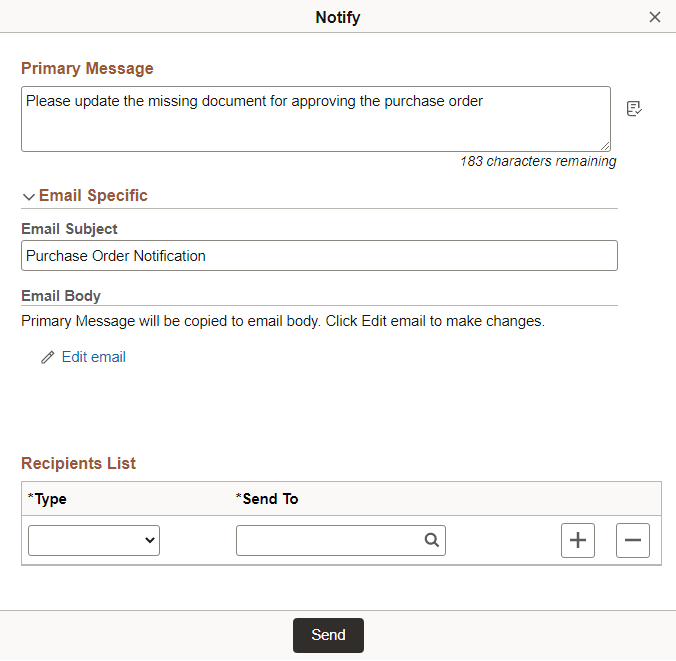
This example illustrates the fields and controls on the Notify page.
| Field or Control | Description |
|---|---|
|
Primary Message |
Enter your own comments. The message text is sent in the language of the sender. The Primary Message will be displayed in the in-app notification in the Notifications panel and in the subject of the text notification. |
|
Email Subject |
Enter the topic or a brief description of the email. The default value is the description of the component from which the notification is invoked, but you can edit it. |
|
Email Body |
Includes the primary message to be delivered in the email. Displays the contents of the Primary Message field by default. |
|
Edit Email |
Select this link to edit the contents of the Email Body. When you select this link, the Copy Primary Message and Available Binds links are displayed. |
|
Type |
Select the type for the recipients list.
|
|
Send To |
Select the sender ID of the recipient. |
Related Topics