Using Smart Prompts
Application developers can configure prompt fields to respond to user choices and display prompt values based on the recently used items or frequently used items. Such prompt fields are called smart prompts.
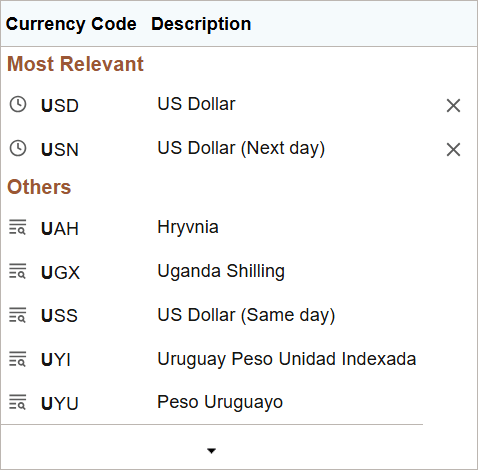
Smart prompt values are separated into two sections, namely, Most Relevant and Others. The Most Relevant section displays the values based on your setting as specified on the My Preferences page. For example, if you select Most frequent first, then in the Most Relevant section of the prompt values, the most frequent items are listed first followed by the most recent items. Similarly, if you select Most recent first, then in the Most Relevant section of the prompt values, the most recent items are listed first followed by the most frequent items.
The Others section displays the remaining items of the prompt values. Both the sections do not display duplicate values, that is, a prompt value is displayed either in the Most Relevant section or in the Others section.
Initially, when you navigate to a prompt field that is enabled for smart prompt, the prompt values are not separated into the Most Relevant and Others sections. After you've selected values from the prompt and when you navigate to the same prompt field a second time, the smart-prompt values are displayed in the Most Relevant and Others sections.
If you select any prompt value inadvertently, you can remove the prompt value from the Most Relevant section by using the delete (x) button.
For information on setting the smart-prompt options, see Specifying General Settings in My Preferences
For information on using smart prompts in grids and scroll area, refer to the Considerations for Using Smart Prompt and Smart Drop-Down in Grids and Scroll Areas section in Adding Rows.
The following example illustrates the display of smart prompt values under the Most Relevant and Others sections.
Considerations for Displaying the Others Section in Smart Prompt
The Others sections is not displayed in the following scenarios:
-
Type ahead or auto-complete feature is not enabled for a field; in this case, only the Most Relevant section is displayed.
-
Text is not entered in the prompt field (auto-complete enabled); in this case, only the Most Relevant section is displayed.