Configuring New Homes for Upgrade
If you have selected the Configure New Homes for Upgrade check box for an applicable database definition, you must enter the required information for the new homes.
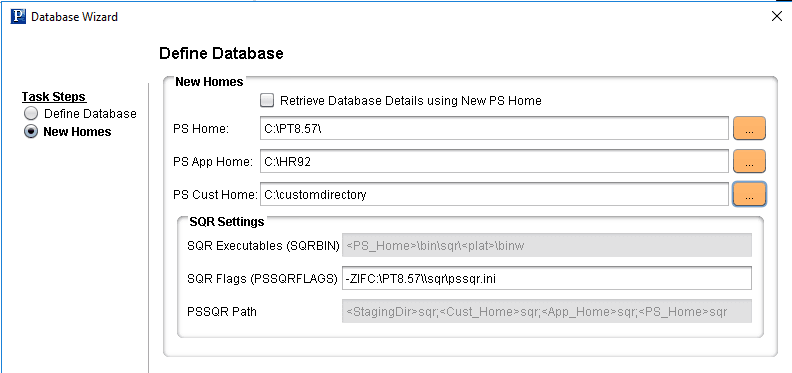
This example illustrates the fields and controls on the Database Wizard – New Homes page. You can find definitions for the fields and controls later on this page.
| Field or Control | Description |
|---|---|
|
Retrieve Database Details using New PS Home |
When performing a PeopleTools upgrade, initially you will connect to your target database using your current PS Home. Once the target database is updated to the new release, the rest of the steps will require you to connect using the New PS Home. Select this checkbox if you need to edit the database after the database has been upgraded to the new PeopleTools release. |
|
PS Home |
Enter the location of new PS_HOME. Note: Oracle recommends using a mapped drive. |
|
PS App Home |
Enter the location of your new PS_APP_HOME. Note: Oracle recommends using a mapped drive. Do not enter your PS_HOME directory. |
|
PS Cust Home |
Enter the location of your new PS_CUST_HOME. Note: Oracle recommends using a mapped drive. Do not enter your PS_HOME directory. |
|
SQR Executables (SQRBIN) |
The SQRBIN value is read only and derived from the PS Home and platform setting. |
|
SQR Flags (PSSQRFLAGS) |
By default , the -ZIF parameter is to set the full path and name of the SQR initialization file, SQR.INI. Make any necessary changes or add additional SQL parameters if needed. |
|
PSSQR Path |
This field is read-only and will contain the path that is used in Change Assistant:
Each path is separated by a “;” (semi-colon). The static display is: “<StagingDir>\SQR;<Cust_Home>\SQR;<App_Home>\SQR;PS_Home>\. |