Defining Databases with Update Manager
Use the Define Database page to retrieve data from customer-maintained databases to PUM source database by invoking the provider API from the PUM source.
Customer-maintained database can be:
-
The target database.
-
An old PUM source containing the customization repository, which is on an older PUM Image.
See Migrating PUM Data.
You can fetch data from customer-maintained databases without having to configure its PeopleSoft client information in Change Assistant.
Important:
Integration objects created as part of provider REST service will be delivered for customer-maintained databases environments on PeopleTools releases prior to 8.60.
Only minimal information, such as, hostname and credentials, are fetched from the target database.
Prior to PeopleTools 8.60, target databases needed to be defined in Change Assistant. In PeopleTools 8.60 and higher, you can define the database in Update Manager.
For instructions on defining databases in Change Assistant, refer Defining Databases
Navigation
This example illustrates the fields and controls on the Define Database page. You can find definitions for the fields and controls later on this page.
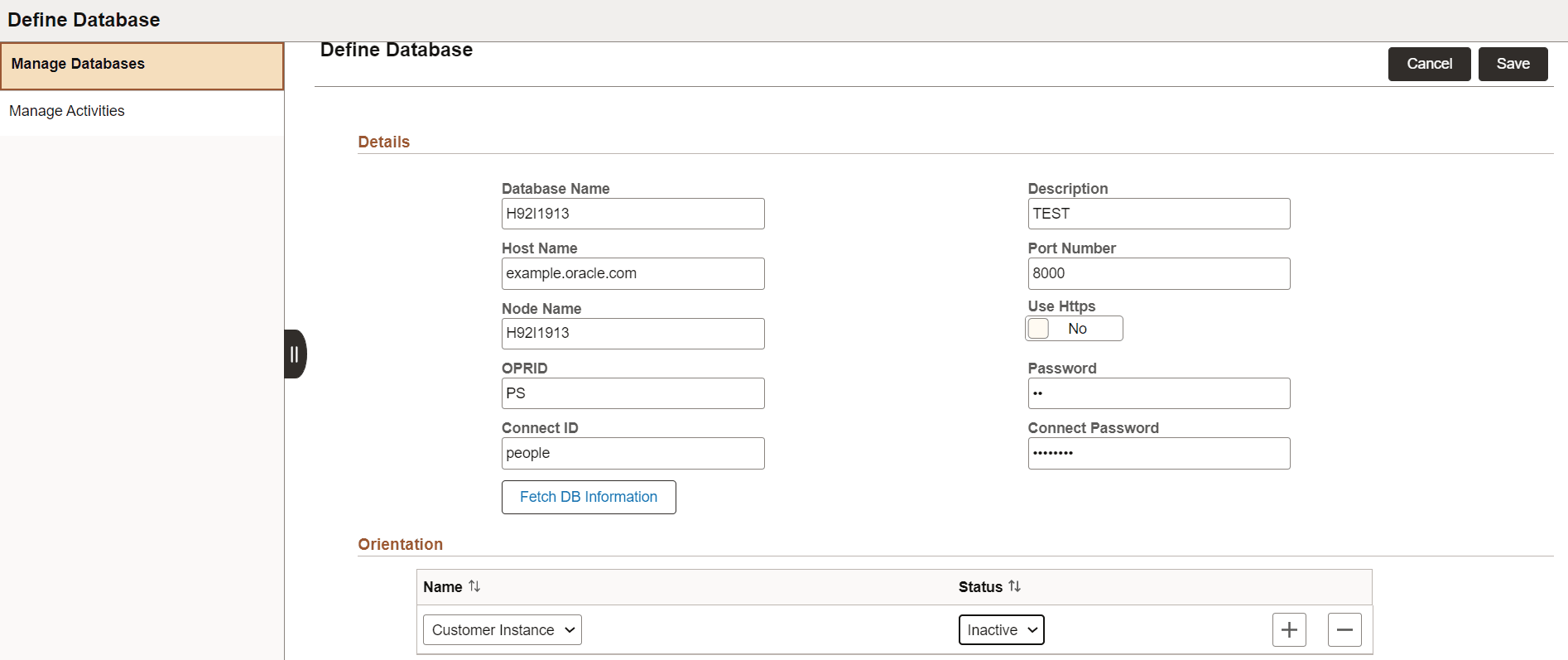
| Field or Control | Description |
|---|---|
|
Database Name |
Enter the database name. |
|
Description |
Use this field to provide a more detailed description of the new database. |
|
Hostname |
Enter the hostname of the webserver for the target database. |
|
Port Number |
Enter the port number of the webserver for the target database. This is the port used to create the REST Base URL. |
|
Node Name |
Enter the default local node name of the target database. This is the node used to create the REST Base URL. |
|
Fetch DB Information |
Click this button to invoke REST API for the environment specified as the hostname. If the connection is successful, the REST API returns basic database information, such as, PeopleTools version of the target database, languages installed, and base language. This information is stored in the PUM source database. |
|
Orientation |
Name: Based on the information returned after the connection is successful, you can define a role or orientation for the PeopleSoft PUM source database. For details, refer the succeeding section on database orientation. Status- Use this field to set the orientation Active or Inactive. |
Once you define the database, it appears on the Manage Database page.
Database Orientation
You can assign a role or orientation for the defined database.
Based on the orientation, you can retrieve different metadata from the customer maintained database.
The database role or orientation options are:
| Orientation | Description |
|---|---|
|
Customization Instance |
Sets the defined database (remote database) to upload customization projects. Customization projects contain either custom or deliver-objects that are customized by the customers. Customizations are uploaded using a project which has these objects. |
|
Source-Old |
Sets the defined database (remote database) as old PUM source, which contains maintenance bug metadata that is required to analyze and create Change Packages. When the next PeopleSoft Image releases, customer can use this metadata and proceed with the PUM activities. Run the Retrieve Old PUM Metadata activity from the Defined Activity page on this database to retrieve customer metadata such as, package definitions of the old PUM source, customization repository data, test repository data, PUM automated updates from the old PUM source. |
|
Target |
Sets the defined database (remote database) as the target database and retrieves target information. Target database, which is on an older release, contains information, such as maintenance log. You can use the target database information, to create a change package for applying upgrade or update maintenance. |
|
Usage Monitor |
Sets the remote database as the Usage Monitor database. Customers can use the usage data to analyze and then add objects to the Change Package. For details, refer to Handling Usage Monitor Data |
Based on the orientation, different database activities appear for the remote database.
There can be multiple orientation for a remote database.
For details on the database activities, refer Defining and Managing Database Activities.