Managing Databases
The Manage DBs page lists databases that were defined and uploaded through Change Assistant or defined in the Define Database page in PAU.
Initially the page displays a single row with the current PUM source database, which has only the Source-Current orientation. The current PUM source details will be read-only.
This example illustrates the fields and controls on the Manage DBs page. You can find definitions for the fields and controls later on this page.
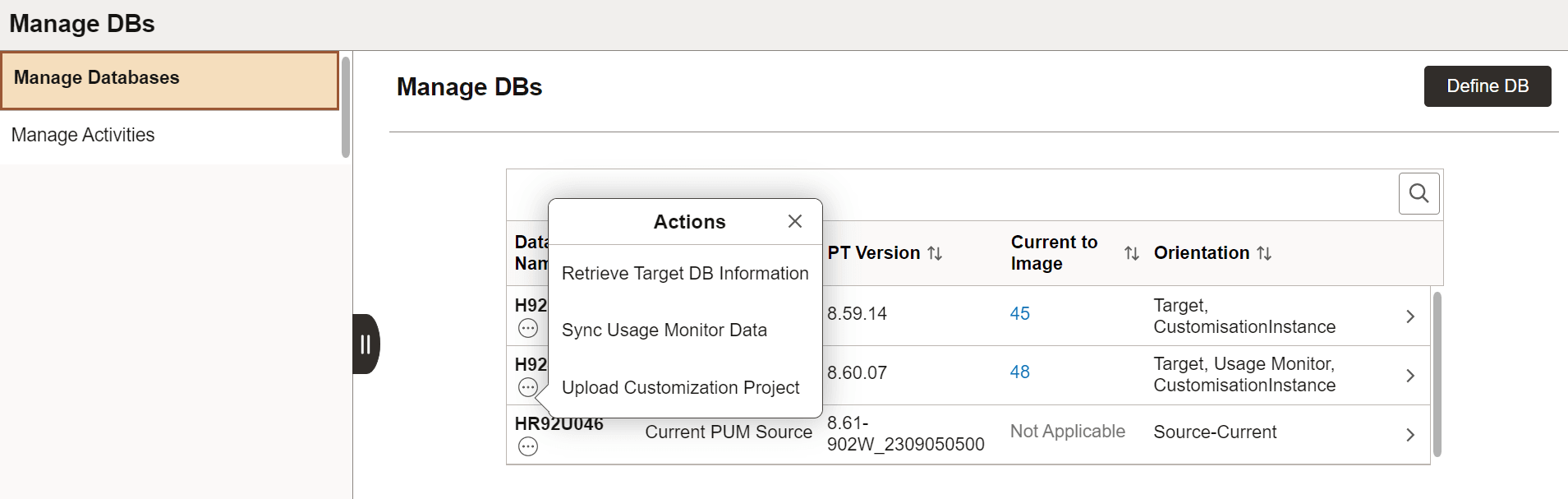
The Actions options on the database activities appear for each database based on the database orientations defined for this database. The database can have multiple orientations.
In this example, the database on the second row (H92TD906) has three database activities based on the orientations selected. The Upload Customization Project database activity appears only because one of the orientation is Customisation Instance. Suppose you select one of the activities, such as, Sync Usage Monitor Data, then the Define Activity page opens with the pre-defined parameters.
For more information on database activities, refer Defining Database Activities.
Note:
The Current to Image number appears when you run the Retrieve Target DB Information activity for the chosen database.
For further details, refer Viewing Maintenance Levels of Target Environment