Defining Default Merge Rules
The default merge rules provide the basis for the automatic merge.
Select the Edit button for default merge rules to review or modify the default merge rules. This merge rules are considered as global merge settings and can be used in all future merge sessions.
When the merge analysis runs, if a difference is detected for a line of code, this table is used to determine the action to be taken based on the status combination.
This example illustrates the fields and controls on the Default Merge Rules page. You can find definitions for the fields and controls later on this page.
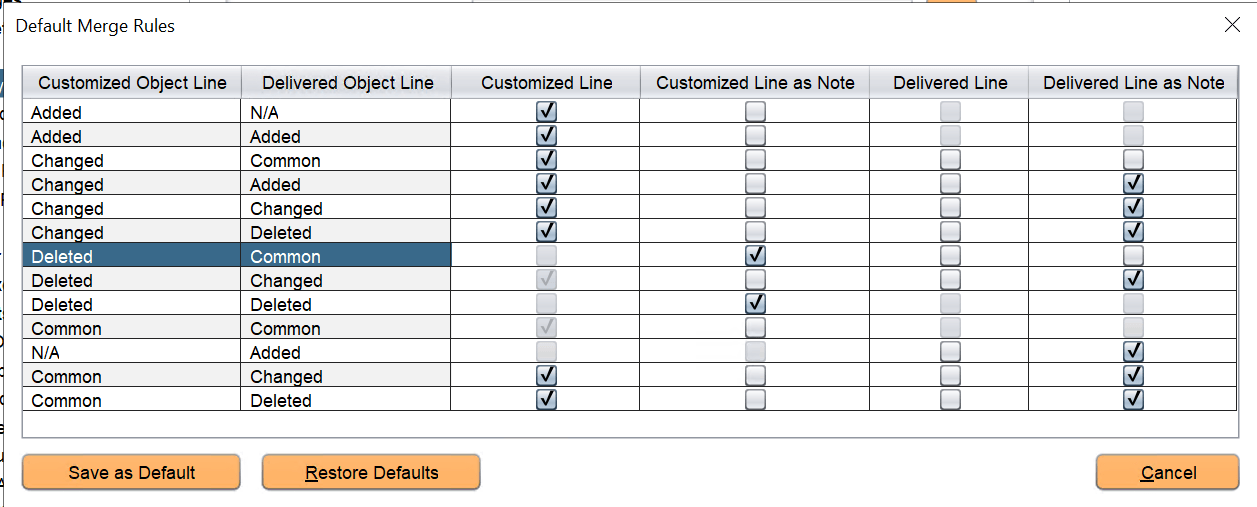
Modify the default rules as necessary for your environment.
Customized Line is the data uploaded by user to the customization and merge repository.
Delivered Line is PeopleSoft delivered data in the PUM source.
If Customized Line or Delivered Line is selected, then it is considered for merge whenever there is a merge conflict.
If the Customized Line as Note or Delivered Line as Note column is selected, the customized or delivered line will be displayed as a note and greyed out in the Merge Session. This helps to visualize and verify which line is getting merged or replaced by the merge rules. Basically, these lines are not added to the merged output.
Select the Restore Defaults button to restore the default rules that was already delivered.
Select the Save as Default button to keep the modified merge rule as default.
Review the merge rules in the following table. This table details the merge rules that are displayed in the preceding Default Merge Rules page example.
In this table, the Customized Object Line column shows the result of line by line comparison between the customized object line and the baseline object. The values such as Added, Changed, Deleted, and so on are displayed based on this comparison. Similarly, the Delivered Object Line column displays values based on the line by line comparison between the PeopleSoft delivered object and the baseline object.
| Rules | Customized Object Line | Delivered Object Line | Customized Line | Customized Line as Note | Delivered Line | Delivered Line as Note |
|---|---|---|---|---|---|---|
|
Added-N/A |
Added- This line was newly added by the user. |
N/A- No new delivered line is added in the delivered object when compared with the baseline object. |
The customized line is selected and will be considered for the merge. |
Not selected. |
Not available for selection because no new delivered line is added. |
Not available for selection. |
|
Added-Added Note: When the newly added customized line and the delivered line are different, then Added-N/A and N/A-Added merge rules will be applicable. |
Added- This line was newly added by the user. |
Added- PeopleSoft also delivered the same line. |
The customized line is selected and will be considered for the merge. |
Not selected. |
Not available for selection. In this case customized line and delivered line are the same. To prevent duplication, the delivered line is not available for selection. |
Not available for selection. |
|
Changed-Common |
Changed- This line in the customized object was changed by the user while comparing with the baseline object. |
Common- This line in the delivered object is same as the line in the parent (baseline) object. Therefore, there is no change in this line. |
The customized line is selected and will be considered for the merge. |
Not selected. |
Not selected. Note: You can select both the customized line and delivered line in this merge rule. |
Not selected. |
|
Changed-Added |
Changed- This line in the customized object was changed by the user while comparing with the baseline object. |
Added-PeopleSoft delivered a new line. |
The customized line is selected and will be considered for the merge. |
Not selected. |
Not selected. Note: You can select both the customized line and delivered line in this merge rule. |
Selected. The delivered new line will appear as a note. This note let users know as per this merge rule the customized line will be selected in merge output, not the new line in the delivered object. Helps users to verify which is the conflicting line and which is the chosen line in the merge session. |
|
Changed-Changed |
Changed- This line in the customized object was changed by the user while comparing customized object with the baseline object. |
Changed- This line in the delivered object is changed by PeopleSoft while comparing with the baseline object. |
The customized line is selected and will be considered for the merge. |
Not selected. |
Not selected. |
Selected. The changed line in the delivered object will appear as a note. |
|
Changed-Deleted |
Changed- This line in the customized object was changed by the user while comparing customized object with the baseline object.. |
Deleted- This line in the delivered object is deleted when comparing delivered object with the baseline object. |
The customized line is selected and will be considered for the merge. |
Not selected. |
Not selected. |
Selected. In this note, the deleted line from the delivered version is displayed. |
|
Deleted-Common |
Deleted-This line in the customized object is deleted by the user while comparing customized object with the baseline object. |
Common- This line in the delivered object is same as the line in the parent (baseline) object. Therefore, there is no change in this line. |
Not available for selection. |
Selected. In this note, the deleted line from the customized object is displayed. |
Not selected. |
Not selected. |
|
Deleted-Changed |
Deleted- This line in the customized object is deleted by the user while comparing customized object with the baseline object. |
Changed- This line in the delivered object is changed by PeopleSoft. |
The deletion of this customized line was considered during the merge. |
Not selected. |
Not selected. |
Selected. The delivered line will be shown as a note. |
|
Deleted-Deleted |
Deleted- This line in the customized object is deleted by the user while comparing customized object with the baseline object. |
Deleted- This line in the delivered object is deleted while comparing delivered object with the baseline object. |
Not available for selection as the line is deleted in both customized object and delivered object. |
Selected. In this note, the deleted line from the customized object is displayed. |
Not available for selection as the line is deleted in both customized object and delivered object. |
Not selected. |
|
Common-Common |
Common- This line in the customized object is same as the line in the parent (baseline) object. Therefore, there is no change in this line. |
Common- This line in the delivered object is same as the line in the parent (baseline) object. Therefore, there is no change in this line. |
The customized line is considered during the merge. |
Not selected. |
Not available for selection as the line is same. |
Not selected. |
|
N/A-Added |
N/A-No new customized line is added in the customized object when compared with the baseline object. |
Added-PeopleSoft delivered a new line. |
Not available for selection because no new customized line is added. |
Not selected. |
Not selected. |
Selected. The newly added line is displayed as a note. |
|
Common-Changed |
Common- This line in the customized object is same as the line in the parent (baseline) object. Therefore, there is no change in this line. |
Changed- This line in the delivered object is changed by PeopleSoft. |
The customized line is selected and will be considered for the merge. |
Not selected. |
Not selected. |
Selected. The delivered line will be shown as a note. |
|
Common-Deleted |
Common- This line in the customized object is same as the line in the parent (baseline) object. Therefore, there is no change in this line. |
Deleted- This line in the delivered object is deleted while comparing delivered object with the baseline object. |
The customized line is selected and will be considered for the merge. |
Not selected. |
Not selected. |
Selected. In this note, the deleted line from the delivered version is displayed. |
From PeopleTools 8.61, you can choose to modify the merge rules of a specific session and re-run the merge analysis. In this way, you don't have to always edit the default merge rules through Tools, Options, PUM Source tab.
For details on modifying the merge rules of a specific session, see Viewing PUM Automated Merge Sessions, Merge Action Menu.
Versioning of Objects
Customization objects that are uploaded to merge repository are assigned a version number. Only those objects that have version numbers are considered during the merge analysis step.
After running merge analysis, when the promote merge step is run, the merged output is written back to the merge repository with a newly calculated version number.
The versioning format is nn.xx.yyy.
where,
nn- indicates the Image
number.
xx- is reserved for future
use.
yyy- indicates the upload
iteration of the object. This increments when the same object is uploaded again.
Example on how versioning is calculated:
Consider a development (target) database which has updates applied from Application Update Image 12. An Object X (Peoplecode, XSLT, or SQL), has been customized by user in the development database.
Assume that the same object X was modified or delivered by multiple bugs (Bug 1, Bug 3, Bug 7, and Bug 8) in the following Images, which were applied to the development database:
-
Bug 1 delivered in Image 05.
-
Bug 3 delivered in Image 07.
-
Bug 7 delivered in Image 11.
-
Bug 8 delivered in Image 13.
If bugs Bug 1, Bug 3 and Bug 7 were applied on the development (target) database, then the version of Object X in the PUM Source will be 11.00.001, where:
11- indicates the version of
the highest Image in which Object X was modified or delivered.
00- reserved for future
use.
001- indicates the upload
iteration. In this case, the Object X was uploaded for the first time.
If the same object is uploaded again, then the version of Object X is 11.00.002.
If all the bugs Bug 1, Bug 3, Bug 7, and Bug 8 are applied on the development database, then the version of Object X will be 13.00.001.
An Object Y, which is created by customer, and not delivered by PeopleSoft Images will not be considered for merge. This object is assigned the version 99.00.001 to identify as a customer created object. Object Y is not part of the merge process since there is no equivalent delivered object.
Assume that Bug 9 delivers Object X in Image 14. If the merge process is run using Image 14 with Object X, then the merged version of Object X is assigned 14.00.001 and written-back to the merge repository.
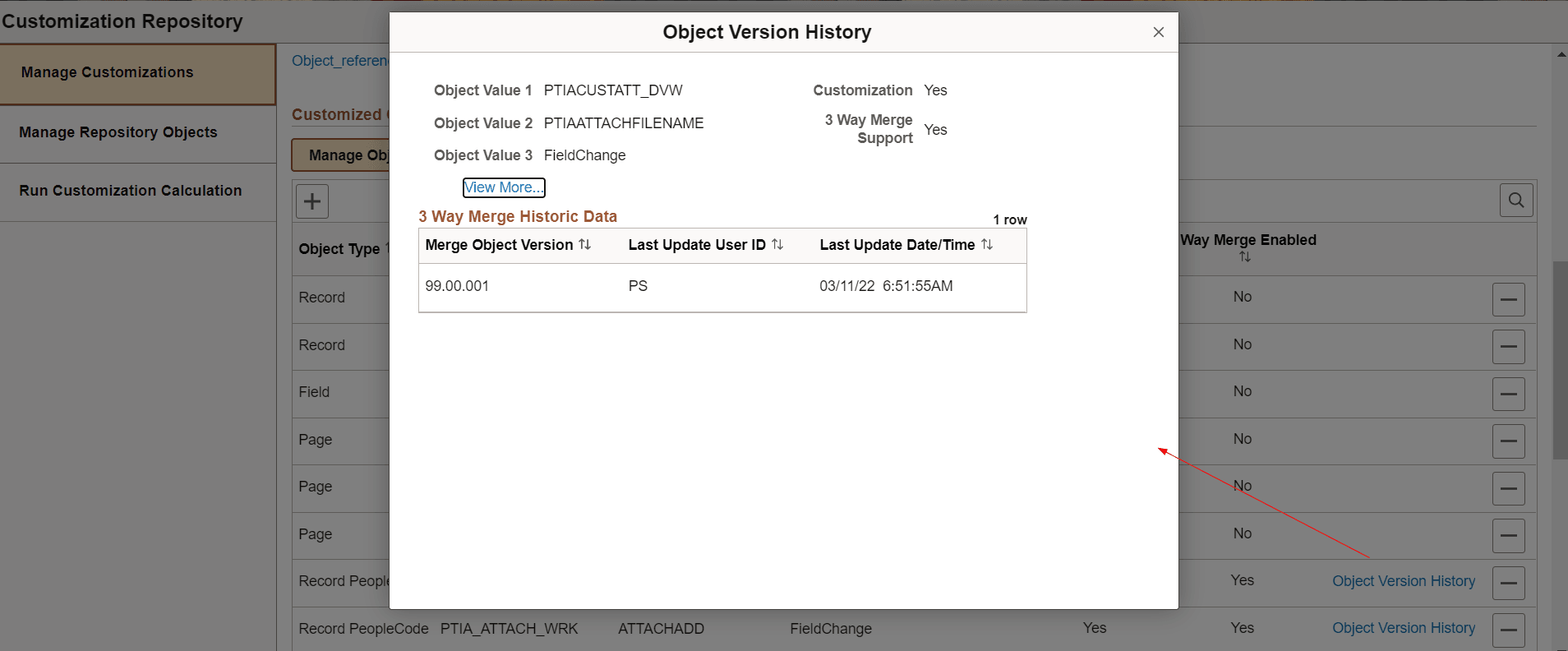
On the Customization Repository pages in PIA, you can view the version numbers of the customization objects.
This example illustrates the fields and controls on the Object Version History page.