Selecting Updates by Prod/Severity/Image
Select the Prod/Severity/Image link.
This example illustrates the fields and controls on the Search by Product/Severity/Image page. You can find definitions for the fields and controls later on this page.
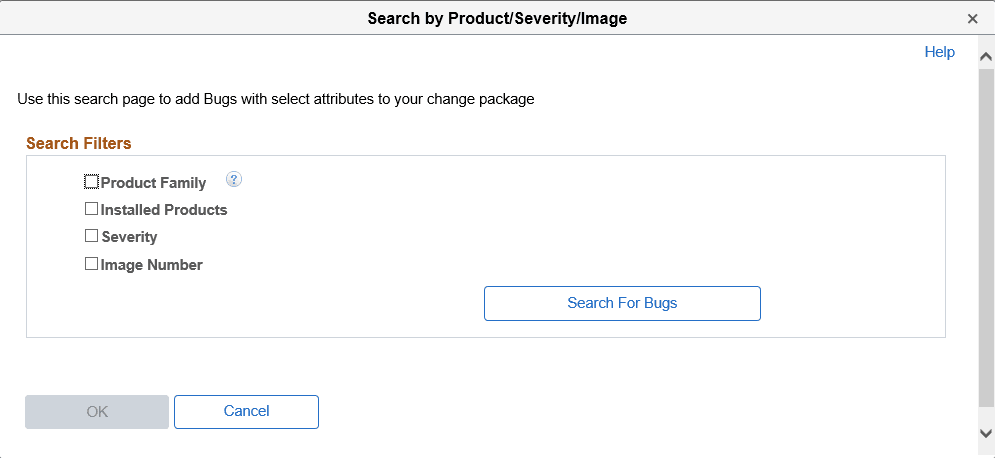
The Search by Product/Severity/Image page, enables you to search for updates by:
-
Product Family
Allows you to select one or more values.
A Product Family is a grouping of products. This grouping is defined by PeopleSoft, and is intended to align with the “Bundle” groupings in non-PUM enabled application updates.
Note:
Product Family = PNA will select all fixes for Payroll North America (equivalent to a PNA Tax Update in prior releases),
Product Family = Global Payroll will select all fixes for Global Payroll products (equivalent to a GP Update Bundle in prior releases).
-
Installed Products
You can select if you want to include related components and subcomponents and then select the installed products to search. A related component or subcomponent is a defined relationship between products. This relationship is defined by PeopleSoft, and is intended to assist the search experience by including the related products automatically when a given product is selected.
-
Severity
Select the severity:
-
1 - Complete loss of service
-
2 - Severe loss of service
-
3 - Minimal loss of service
-
-
Image Number
When you select this option you see drop-down lists for From PI and To PI. Enter a range of image numbers to include in the search.
The minimum allowed value is image 1.
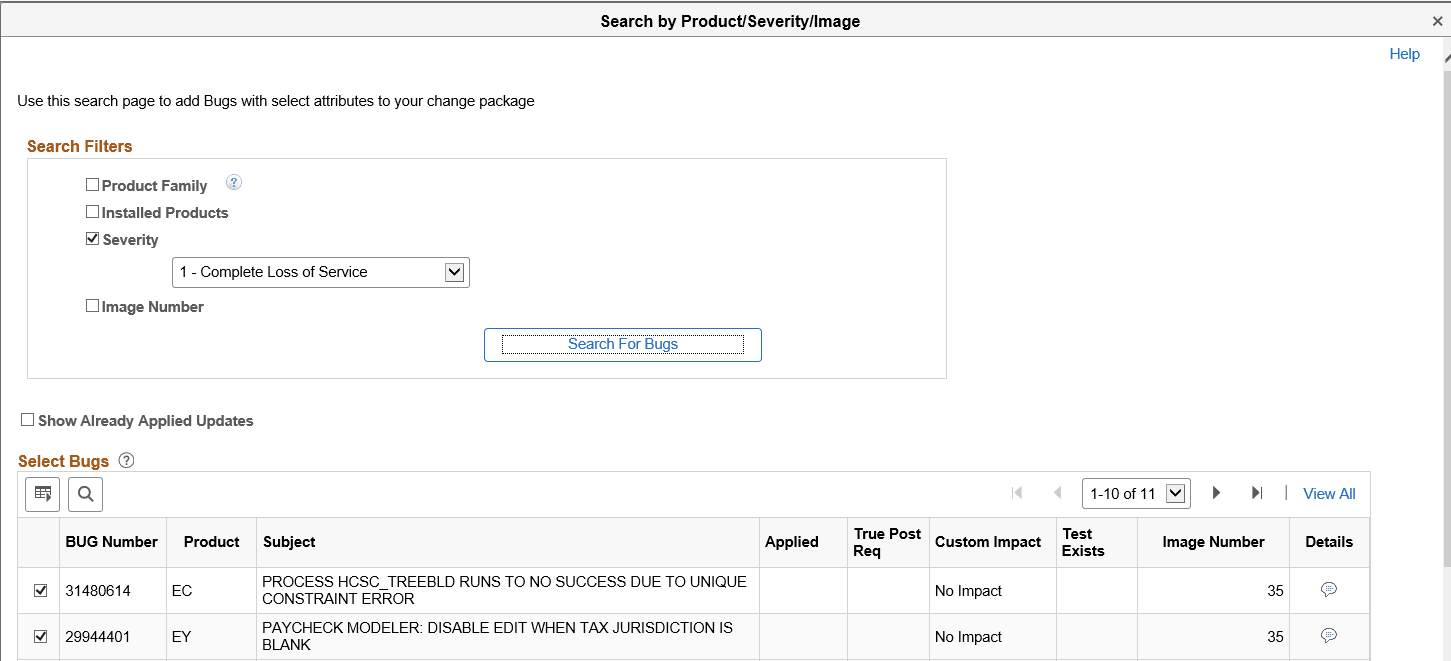
This example illustrates the fields and controls on the Example Search by Severity. You can find definitions for the fields and controls later on this page.
| Field or Control | Description |
|---|---|
|
Show Already Applied Updates |
Select this check box to include already applied updates in the result set. If this check box is selected, a visual indicator will appear in the Applied column. |
|
Bug Number |
Lists the bug numbers returned by the search. |
|
Subject |
Displays the subject for the bug. |
|
Applied |
A visual indicator will be displayed, if the Show Already Applied check box is selected and the bug has already be applied to the target database. This bug is not included in the change package definition. |
|
True Post Req |
True post-requisite updates will be sorted to the top of the bug list. A visual indicator is displayed to identify the bug as true post requisite. All bugs discovered based on the Post Requisites for (Select) Previously Applied bugs will be listed as suggested. |
|
Custom Impact |
Indicates whether or not the bug has an impact on an object stored in the Customization Repository. If the Customization Calculation has not been run this column will display Run Calc. |
|
Test Exists |
A visual indicator will be displayed if the bug has an impact on tests defining in the Test Repository. |
|
Image |
Image number that contains the bug. |
|
Details |
Click this icon to display the bug details. |