Setting Additional Options
This example illustrates the fields and controls on the Change Assistant - Additional Options page. You can find definitions for the fields and controls later on this page.
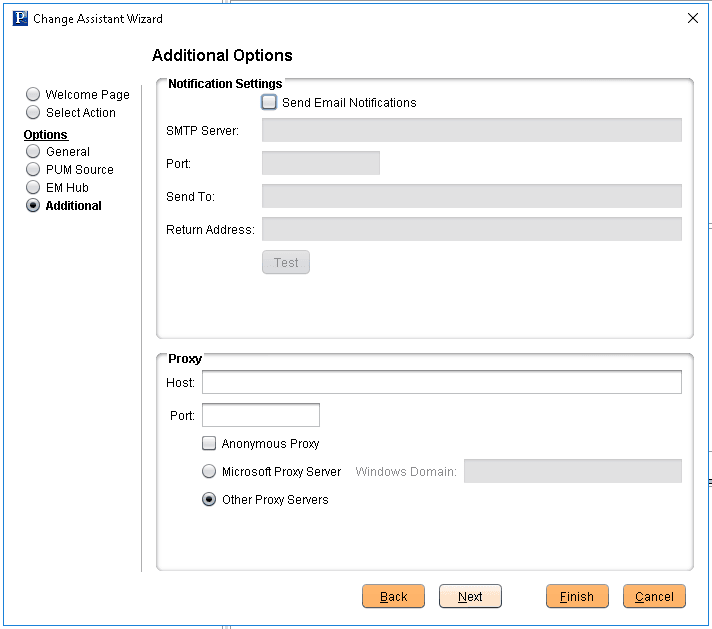
Notification Settings Section
| Field or Control | Description |
|---|---|
|
Send Email Notifications |
Select this check box to receive email notifications if there are errors in the update process. Change Assistant also sends you a completion message when it encounters a Stop in the update process. |
|
SMTP Server |
Enter the SMTP mail server from which you receive the error or completion messages. |
|
Port |
Enter the port from which you want to access the email. |
|
Send To |
Enter the address to which you want the email sent. |
|
Return Address |
Enter the email address of the sender. Use this to identify who sent the notification. |
|
Test |
Validates that email is sent to the designated recipients and is working correctly. Note: Ensure that your SMTP server is installed and configured correctly. |
Proxy Section
| Field or Control | Description |
|---|---|
|
Host |
(Optional) Enter the name of the proxy server if you want to run Change Assistant behind the firewall using a proxy server. |
|
Port |
(Optional) Enter the port number for the proxy server. |
|
Anonymous Proxy |
Indicates that you are using a proxy server that does not require authenticated connections. |
|
Microsoft Proxy Server |
Indicates that you are using a proxy server with Windows authentication. |
|
Windows Domain |
The network domain in which the system runs. |
|
Other Proxy Servers |
Indicates you are using non-Microsoft proxy servers. |