Setting EM Hub Options
EM Hub Options
Use this page to configure the EM Hub options for the target database.
This example illustrates the fields and controls on the Change Assistant - EM Hub Options page. You can find definitions for the fields and controls later on this page.
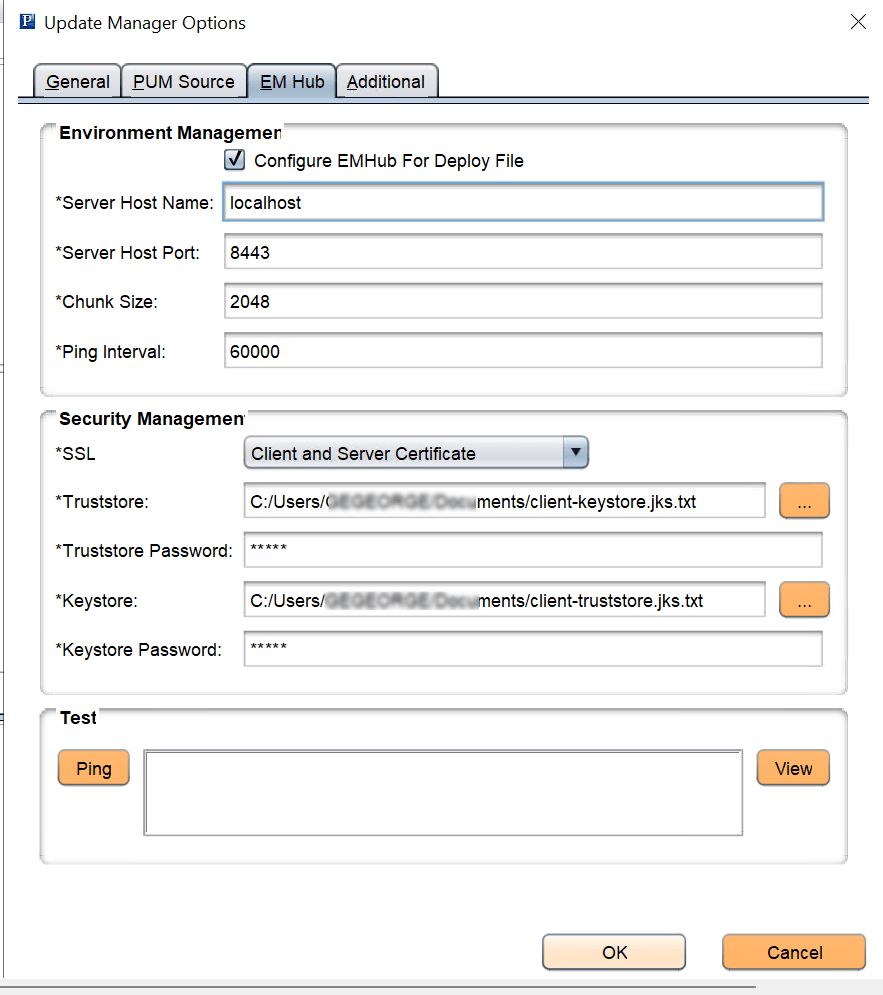
| Field or Control | Description |
|---|---|
|
Configure EMHub For Deploy File |
Select this check box if you want to use EMHub for file deploy. Note: In order to use this option EMF must be configured and running. |
|
Server Host Name |
The hostname of the server in which the Environment Management HUB resides. |
|
Server Host Port |
Indicates the port in which to connect to the Environment Management hub. |
|
Chunk Size |
Used for deploying files during a software update. Default is 1024 * 1024 bytes. Typically this does not need to be changed unless there are a significant number of files greater that 1024KB in a software update. |
|
Ping Interval |
Ping interval is in milliseconds for Change Assistant to contact the hub for new messages. |
|
SSL |
You can choose to allow connections from clients who are part of the allowlist or use two-way SSL. The different connections are:
If the EM Hub server uses the connection type HTTP or one-way SSL, then the client hostname or IP address need to be added to the allowedhost.properties file so that the client host is allowed to make a connection request. The allowedhost.properties file is
available in For details, refer Configuring the Environment Management Hub. |
|
Truststore |
Select the truststore file. |
|
Truststore Password |
Enter the truststore password which is encrypted and then stored in psvault file. |
|
Keystore |
Select the keystore file. For details on configuring keystore and truststore, refer System and Server Administration: Implementing WebLogic SSL Keys and Certificates. |
|
Keystore Password |
Enter the keystore password which is encrypted and then stored in psvault file. For details on generating encrypted passwords, refer Security Administration: Generating a Unique Encryption Key |
|
Ping |
Click to verify a valid server URL. If you see Service is off to the right of this button, then you must correct the server URL and ping again until you see Service is on. |
|
View |
Click to display the list of all PeopleSoft components discovered and registered in the Environment Management Hub. |
Environment Management Hub Summary
When you click the View button, the Environment Manager Hub Summary page is displayed.
This example illustrates the fields and controls on the Environment Management Hub Summary page. You can find definitions for the fields and controls later on this page.
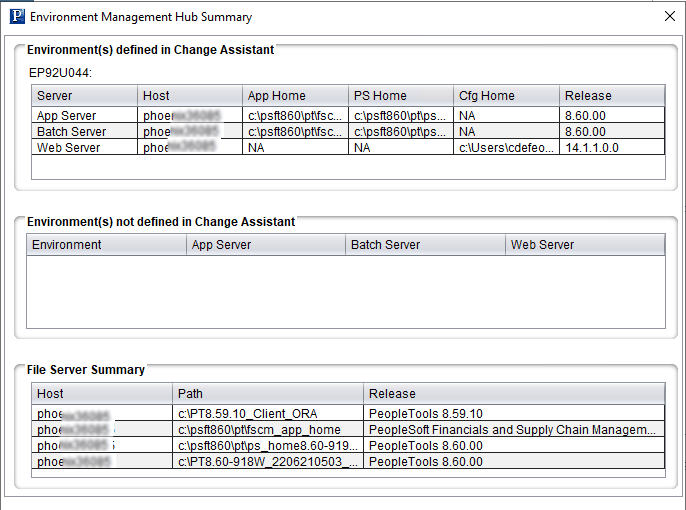
| Field or Control | Description |
|---|---|
|
Environment(s) defined in Change Assistant |
If the database has been defined in Change Assistant, the grid will display the Server, Host, App Home, PS Home, Cfg Home and Release for each database that is discovered by EMF and defined in Change Assistant. |
|
Environment(s) not defined in Change Assistant |
If EM Hub is running and it discovers databases , that have not yet been defined in Change Assistant, they will be listed. |
|
File Server Summary |
Lists the file servers discovered by EM Hub. |