Select Task
This example illustrates the fields and controls on the Change Assistant Wizard - Select Task page. You can find definitions for the fields and controls later on this page.
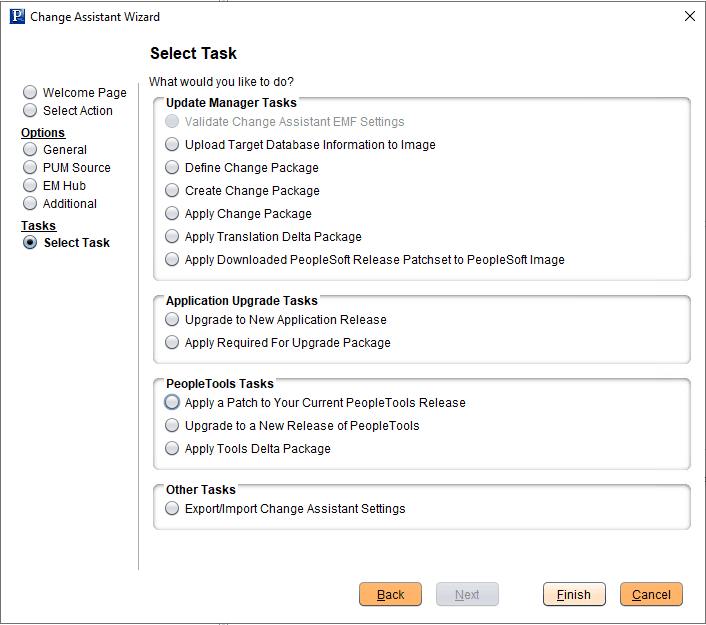
Depending on the options configured, some tasks may be not be enabled. For example if EM Hub is not defined, Validate Change Assistant EM Settings will be grayed out.
| Field or Control | Description |
|---|---|
|
Validate Change Assistant EMF Settings |
Select to validate the settings. Change Assistant validates settings by:
|
|
Upload Target Database Information to PUM Source |
Select to upload the target database information to the PUM source database. Once the database information is uploaded, the database will be available in PeopleSoft Update Manager as a target database. |
|
Define Change Package |
Select to open the Wizard that will guide you through the process of defining a change package. Change packages can be defined using Update Manager Dashboard or Change Assistant. |
|
Create Change Package |
Select to open the Wizard that will guide you through the process of creating a change package based on defined change package. |
|
Apply Change Package |
Select after the custom change package has been created to apply the change package to your target database. |
|
Apply Downloaded PeopleSoft Release Patchset to PeopleSoft Image |
Select to apply a PRP to the PeopleSoft Update Image. See Applying Downloaded PeopleSoft Release Patchset to PeopleSoft Update Image |
|
Upgrade to New Application Release |
Select to upgrade your target database to a new application release. |
|
Apply a Patch to Your Current PeopleTools Release |
Select to apply a PeopleTools patch change package. |
|
Upgrade to a New Release of PeopleTools |
Select to apply a new release of PeopleTools change package. |
|
Export/Import Change Assistant Settings |
Select to export or import Change Assistant Settings. |
From this page, you also have the ability to go directly to other pages by selecting the radio button on the left:
| Field or Control | Description |
|---|---|
|
Welcome Page |
Select to go to the Welcome page. |
|
Select Action |
Select to go to the Select Actions page. |
|
General |
Select to go to the General Options page. |
|
PUM Source |
Select to go to the PUM Source Options page. |
|
EM Hub Options |
Select to go to the EM Hub Options page. |
|
Additional |
Select to go to the Additional Options page. |
|
Select Task |
This radio button is selected by default to lead you through the wizard for the option selected on the right. |