Defining Primitive Element Properties
When you add a primitive element data type to a document, the properties that you can define for the element appear on the right side of the Document Builder - Document page.
In this example, a primitive element data type is selected. The element properties available to define for the new primitive appear to the right of the document tree.
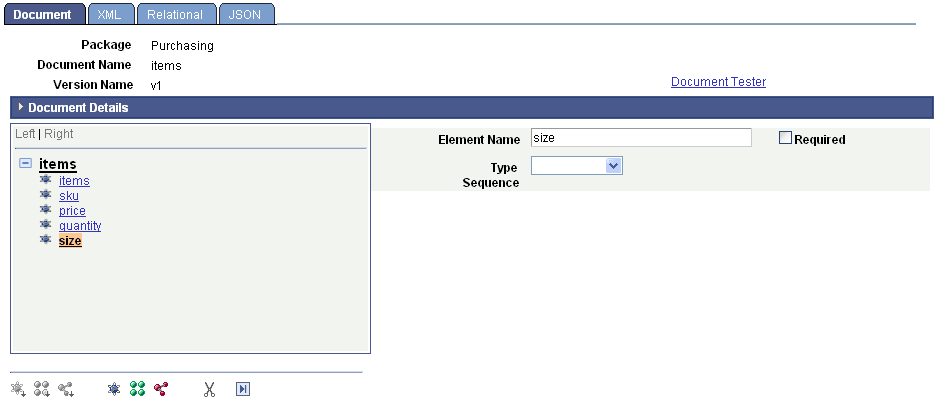
The element data type determines the available properties to define. The primitive data types supported are described elsewhere in this topic.
See Data Types.
The following table describes the properties that you can define for primitive data type elements. Except where noted, the properties in the table are applicable to all primitive data types supported by the system:
| Field or Control | Description |
|---|---|
|
Add Enumerated Values and Show Enumerated Values |
Click the link to define accepted values and their descriptions for a data type. You can define enumerated values for the following primitive data types: Character, Date, DateTime, Integer, String, and Time. |
|
Date/Time Format |
From the drop-down list, select one of the following ISO standard date/time format options:
|
|
Decimal Length |
Enter the number of digits to include to the right of the decimal point. This property is applicable to the Decimal primitive data type. |
|
Description |
Enter a long description of the element. |
|
Element Name |
Enter the name of the element as it will appear in the XML document. |
|
Length |
Enter a length for the element. This property is applicable to the following primitive data types: Binary, Character, Decimal, Integer, String, and Text. Note: For a decimal primitive element, the decimal length is included as part of the overall length. |
|
Required |
Select the check box to indicate that the element must be included in runtime XML and defined as a required element in the XML schema. |
|
Sequence |
The system assigns this read-only field. The sequence number is used for indexing with the PeopleCode API for documents. |
|
Sub-Type |
Select a value from the drop-down list box to further define the data type. This property is applicable to the following primitive data types: Integer, String and Text. The valid values for these data types are:
|
|
Type |
From the drop-down list box, select a primitive data type. The valid values are discussed elsewhere in this topic. See Data Types. |
|
Unbound Maximum |
Select the check box to indicate that the length of the element is unlimited. This property is applicable only to the binary primitive data type. |