Configuring Synchronous Secondary Template Domains
The first step to implementing load balancing using virtual applications server domains is to configure a synchronous secondary template domain.
You use PSADMIN to create synchronous secondary template domains, selecting the IB Sync Secondary configuration template option. Creating secondary templates is described elsewhere in the documentation.
See Creating Template Secondary Domains.
After you create a synchronous secondary template, the domain and its dispatcher processes appear on the Domain Status page in the Service Operations Monitor. To access the page, select
This example illustrates the Domain Status page when a synchronous template secondary is defined. The Domains grid shows the primary domain and the synchronous template secondary domain. The Dispatcher Status grid shows the dispatcher processes for both domains.
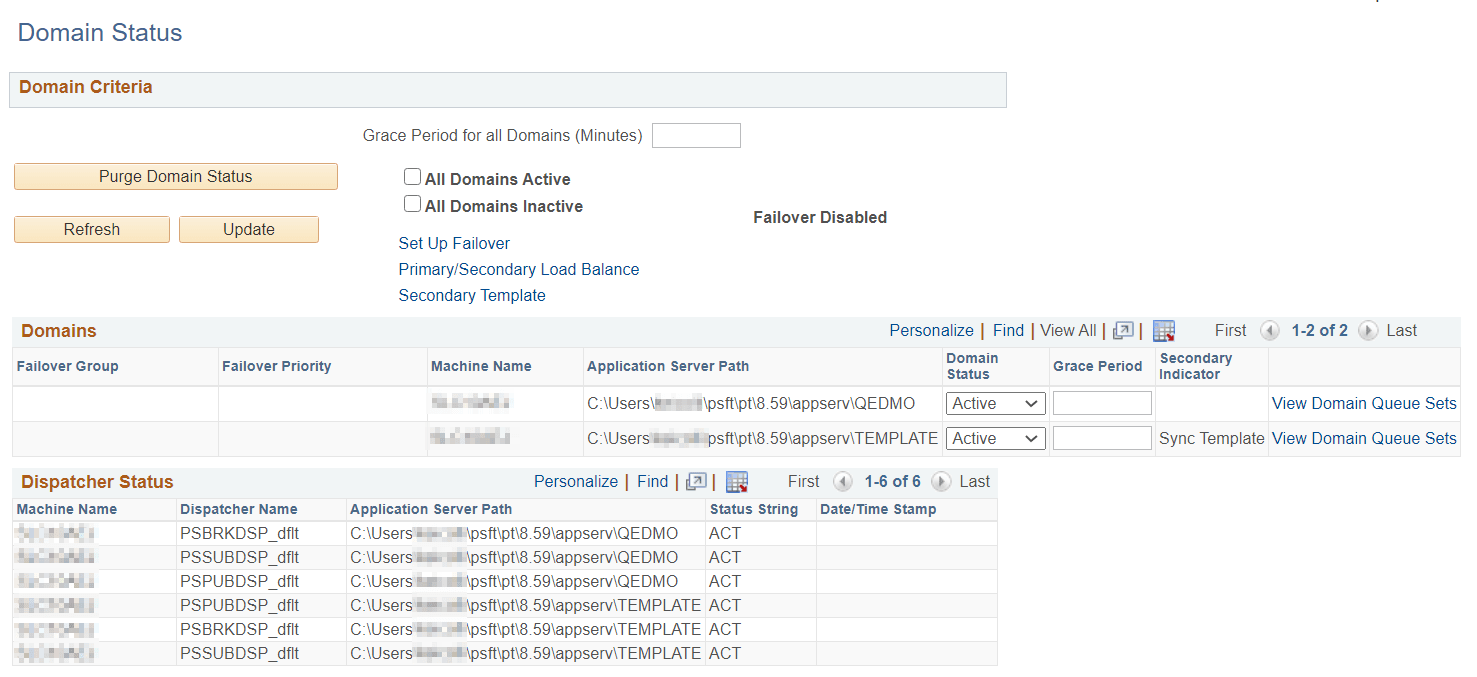
The Domains section of the page shows the primary domain as well as one synchronous secondary template domain. Note that the Secondary Indicator column for the synchronous secondary template reads Sync Template to identify it as a synchronous secondary template. The Dispatcher Status section displays the dispatcher processes for both the primary domain and the synchronous secondary template domain.