Defining Application Server URLs for Load Balancing
When you create a synchronous secondary template domain the system automatically registers the application URL in the Synchronous section of the Secondary Template page. To access the page, select and click the Secondary Templates link.
This example illustrates the Secondary Templates page. The system auto-populates the application server URL the synchronous secondary template in the AppServer URL field.
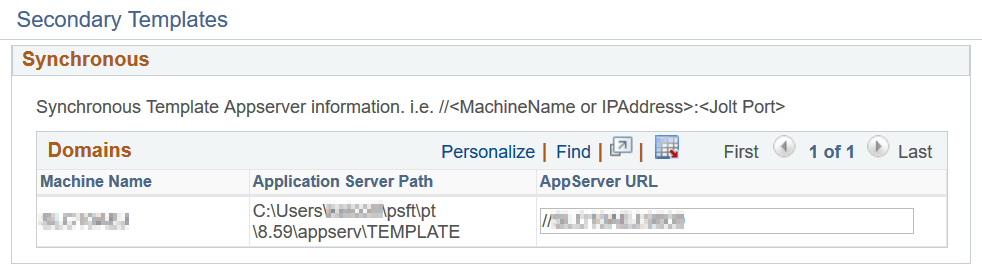
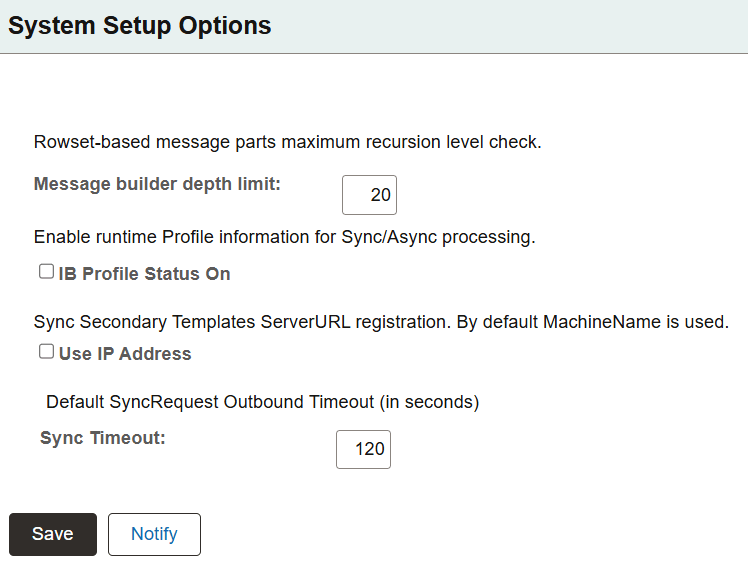
By default the system registers the URL in <machine name>:<jolt port> format. You can change the default so that the system populates the information using the IP address. The System Setup Options page (IB_SYSTEMSETUP) features an option, Use IP Address, that you can select so that the system uses the application server IP address.
To access the System Setup Options page, select
This example illustrates the System Setup Options page. Select the Use IP Address option to use the IP address for the application server URL.
To define the application server URL for a synchronous secondary template using the application server IP address:
-
Access the System Setup Options page (.)
Check the Use IP Address box.
-
Click the Save button.
If you use the System Setup Options page to change the URL format from <machine name>:<jolt port> to IP address, you must synchronize the virtual application server with the gateways defined for load balancing. If you have auto-synchronization set up the synchronization occurs at the interval set for synchronization. You can also perform a manual synchronization.
See Registering and Synchronizing Integration Gateways and Virtual Application Server Domains.