Defining Virtual Server Nodes
When an inbound request is sent without a destination node indicated, you can specify that a PeopleSoft node (as defined in the integration gateway properties file) process the request.
Note:
Defining a virtual server node is optional.
The PeopleSoft Node Configuration page features a Virtual Server Node field. When you want a PeopleSoft node to process an inbound request that was sent without a destination node name, the integration system directs the request to the node specified in the field.
This example illustrates the PeopleSoft Node Configuration page. Use the Virtual Node field to define the node to process an inbound integration when no destination node is defined in the inbound request.
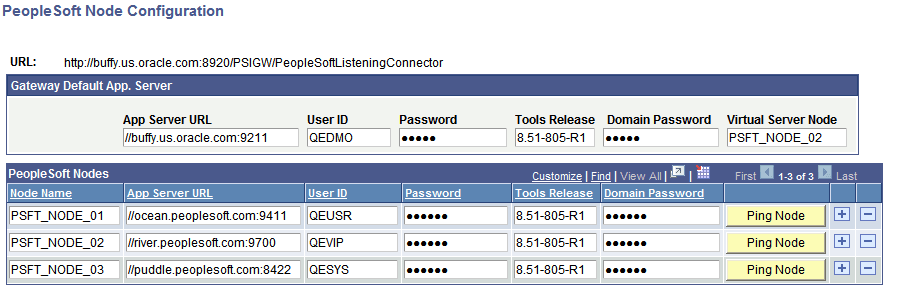
The example shows that the value PSFT_NODE_02 is entered in the Virtual Server Node field. As a result, inbound requests that do not specify a destination node, are sent to the PSFT_NODE__02 node.
You can also specify a virtual server node directly in the integrationGateway.properties file by setting the following property equal to the PeopleSoft node you want to handle the request:
ig.isc.virtualserverNodeIf you specify this information directly in the integrationGateway.properties file, the JOLT connect information must adhere to the example provide in the example in the file. The order of properties must not deviate from the example provided in the properties file, shown here:
#ig.isc.virtualServerNode=VIRTUALSERVERNODE
#ig.isc.serverURL=//MYSERVER:9000
#ig.isc.userid=MYUSERID
#Use the supplied "Password Encryption Utility" to generate an encrypted
#password for the next entry.
#ig.isc.password=encrypted_password
#ig.isc.toolsRel=8.46
#Use the supplied "Password Encryption Utility" to generate an encrypted
#password for the next entry.
#ig.isc.domainConnectionPwd=encrypted_domain_password