Using the Network Status Page
Use the Network Status page to manually verify that integrations are being processed between the local node and remote nodes defined in the integration network. Use the page to also access options to set up and use automated integration processing status verification.
To access the Network Status page (IB_VERIFYNETRS), select
This example illustrates the fields and controls on the Network Status page. You can find definitions for the fields and controls later on this page.
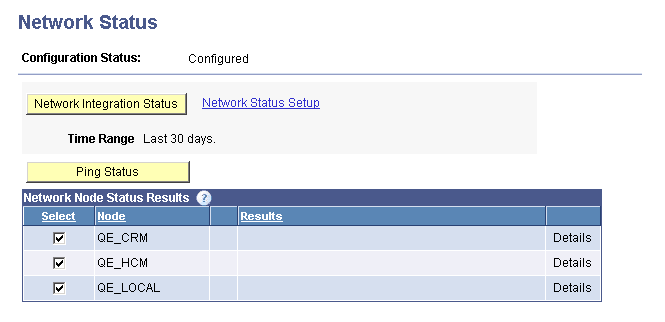
The Network Status page features fields and controls used to access integration network configuration options, perform network integration status verification, and to ping integration network nodes. The following table lists and describes only the fields and controls on the page that are used in conjunction with verifying integration processing in the integration network:
| Field or Control | Description |
|---|---|
|
Configuration Status |
Displays the configuration status of the network. Note: The network must have a status of Configured to verify integration processing among network nodes. The valid values are:
|
|
Network Integration Status |
Use this page control to manually verify the status of integrations with remote nodes defined in the integration network. |
|
Network Status Setup |
Click the link to access the Network Status Setup page and options to set the number of days for which to provide status, include diagnostics in status results, and set up automated integration status checking. |
|
Time Range |
Indicates the time range the system uses for reporting on the network status. Use the Network Status Setup link to modify this value. |
|
Select |
Check the box next to each node to include in ping status or integration processing checks. Clear the box next to each node to exclude in the checks. |
|
Node |
Displays the name of the network node. |
|
Results |
Area where a description of the results of the network status check and network ping appear. Viewing the results of this status check is described later in this topic. |
|
Details |
If additional details of the processing check are available, a Details link appears. Click the link to view the additional information. Viewing details of this status check is described later in this topic. |