Verifying and Managing Integration Gateway Configuration
At a minimum the following settings and options must be configured on the integration gateway for the integration network to function properly:
-
Define the default gateway URL.
-
Load the delivered target connectors.
-
Register nodes.
-
Define the gateway keystore path and keystore password.
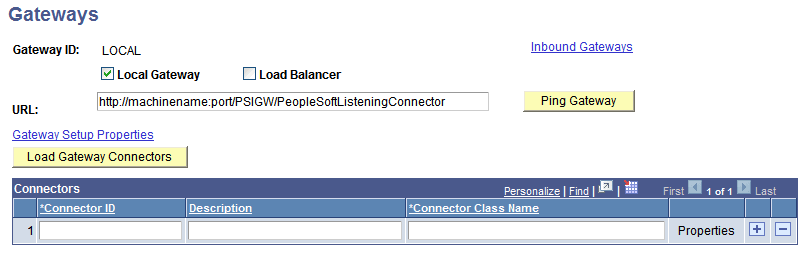
The Configuration Status page features a Gateway Configured link. When you click the link the Gateways component appears and you can view and configure integration gateway settings and options. You can also use the Gateway link in the Integration Network WorkCenter navigation pane to access the Gateways page and the features described in this section.
This example illustrates the Gateways page when no integration gateway has yet been defined:
This table provides links to documentation that describes how to perform the minimum tasks required to configure the integration network:
| Task | Documentation | Comments |
|---|---|---|
|
Define local and remote gateways. |
NA |
|
|
Load target connectors for each gateway. |
See the topic “Loading Target Connectors, Loading Connectors by Introspection. |
|
|
Register nodes. |
You must create the node definitions before you can register and configure them on integration gateways. |
|
|
Define the gateway keystore path and password. |
Gateway digital certificates must be installed on the gateway. Warning! Integrations will fail if you do not set the secure keystore path and password. |