Viewing Node Network Status
The Configuration Status page features a Node Network Configured link that opens the Node Network page. Use the Node Network page (IB_INTNETWORK) to view and configure details about PeopleSoft nodes in the integration network. The Node Network page provides a view of all the PeopleSoft nodes in the database.
Note:
Only PeopleSoft nodes can be viewed and managed in the integration network pages. A PeopleSoft node is one defined as a PIA node type on the Nodes – Node Definition page.
This example illustrates the fields and controls on the Node Network page. You can find definitions for the fields and controls later on this page.
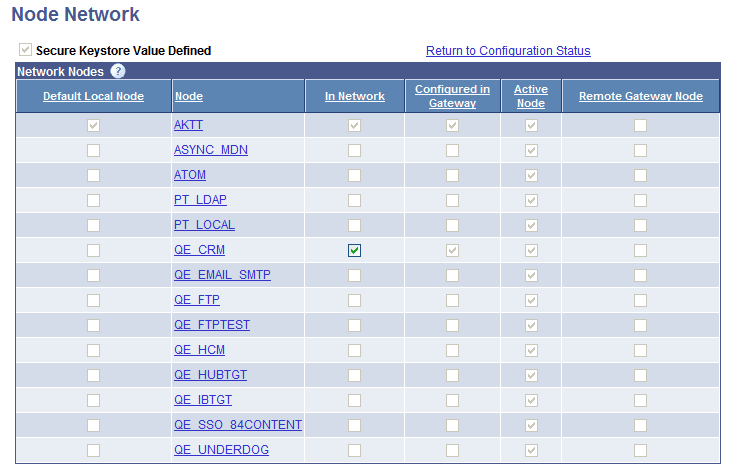
The Node Network page allows you to easily identify the current default local node, nodes that are defined in the integration network, active nodes, and so on.
The following page elements appear on the Node Network page:
| Field or Control | Description |
|---|---|
|
Secure Keystore Value Defined |
This page element is read-only. A check mark in the box denotes that the secure keystore path and password has been defined in the integration properties file for the default local gateway. The Node Network component is not set to Configured until the box is checked; The box displays checked after you define the keystore path and password in the integrationGateway.properties file. Warning! Integrations will fail if you do not set the secure keystore path and password. |
|
Default Local Node |
This page element is read-only. A check mark in this column denotes the default local node in the system. There can be only one default local node in the PeopleSoft database. Additional information about the default local node is provided elsewhere in the product documentation. See Adding and Modifying Nodes in the PeopleSoft DatabaseUnderstanding Nodes. |
|
Node |
The node column lists the PeopleSoft nodes in the database. Only nodes defined as PeopleSoft nodes appear on the page. PeopleSoft nodes are those defined as PIA node types in the node definition. Information about adding and modifying node definitions is provided elsewhere in this topic and in the PeopleTools product documentation. See Adding and Modifying Nodes in the PeopleSoft DatabaseUnderstanding Nodes. |
|
In Network |
A check mark in this column denotes that the node is defined as part of integration network. Important: A node must be “in network? for you to be able view integration information and use the features of the integration network on the node. The default local node is automatically defined in the network. To include a node in the integration network, check the box. To remove a node from the integration network, clear the box. The In Network box is enabled only when the node is active and you have defined jolt connection strings for the node in the integration gateway. Additional information about adding nodes to the integration network is provided elsewhere in this topic. |
|
Configured in Gateway |
This page element is read-only. A check mark in this column denotes that the jolt connection strings for the node have been defined in the integration gateway. Defining jolt connection strings for nodes is described elsewhere the product documentation. |
|
Active Node |
This page element is read-only. A check mark in this column denotes that the node had been defined as an active node in the node definition. To change the active status of a node, click the node name in the grid to access the node definition. Information about activating a node is described elsewhere in the product documentation. |
|
Remote Gateway Node |
This page element is read-only. A check mark in this column denotes that the node is defined on a remote gateway. If the node is defined using a remote gateway, the defined gateway will not be checked to determine if the node information is configured in that remote gateway. |