Adding and Getting Container Messages Attributes
This section discusses how to:
-
Add the language code of the message sender as an attribute to a container message.
-
Add attribute names to a container message.
-
Populate attribute values for container message attributes.
-
Get attribute names and values from a container message.
This section also provides a summary of PeopleCode that you can use to populate attribute values and get attribute data from container messages.
Understanding Adding, Populating, and Getting Container Message Attributes
You can add attributes to container messages that contain rowset-based message parts to provide integration partners with data and information, without adding the information to the message definition.
To add attributes to a container message, you first define the attribute name, length, and required flag in the container message definition in the PeopleSoft Pure Internet Architecture. This information appears in generated container message schema. At runtime the attributes appear at the root level of the generated XML. Next you use PeopleCode to populate the attribute values using the IBInfo object. At runtime, PeopleSoft Integration Broker validates the attribute values against the lengths you defined in the container message definition.
PeopleSoft provides a number of IBInfo object methods to get attributes from container messages.
Adding Language Codes of the Message Senders as Attributes to Container Messages
The language code of the user who executed the publish or sync request is a common attribute to add to a container message. As such, PeopleSoft provides an Include Language Code attribute box, that when selected automatically includes the information as an attribute name and value in the container message.
This example illustrates the Container Attributes page. The example shows that the Include Language Code check box is selected.
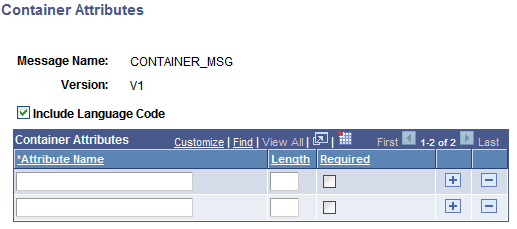
To add the language code of the message sender as an attribute:
-
Access the Container Attributes page ( and click the Container Attributes link).
-
Select the Include Language Code check box.
-
Click the OK button.
-
The Messages–Message Definitions page appears.
Adding Attribute Names to Container Messages
After you add one or more rowset-based message parts to a container message and save the message, a Container Attributes link appears on the Messages-Message Definition page under the Message Type group box. When you click the Container Attributes link, the Container Attributes page (IB_MESSAGE_ATT_SEC).
This example illustrates the Container Attributes page. In the example two attribute names are defined, MessageImportance and DeveloperID.
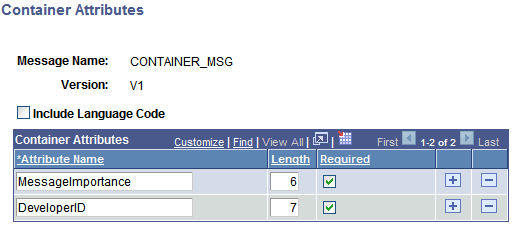
To add an attribute name to a container message:
-
Access the Container Attributes page ( and click the Container Attributes link).
-
In the Attribute Name field, enter a name for the attribute.
-
In the Length field, enter a numeric field length value.
-
(Optional.) Select the Required check box if you want the attribute name to be required.
-
Click the OK button.
The Messages–Message Definitions page appears.
Populating Attribute Values for Container Message Attributes
PeopleSoft provides several IBInfo object methods within the Message object to populate container message attributes.
Here is an example of how to populate attributes. The attribute values will be validated at runtime against the defined lengths.
&MSG = CreateMessage(Operation.MY_SVC_OPERATION);

&ret = &MSG.IBInfo.AddContainerAttribute("MessageImportance", "Medium");
&ret = &MSG.IBInfo.AddContainerAttribute("DeveloperID", "mdawson");
Additional IBInfo objects that you can use for working with container message attributes are described elsewhere in this section.
Getting Attribute Names and Values from Container Messages
PeopleSoft provides several IBInfo object methods within the Message object to Get attribute information from container messages.
Note that if you attempt to read attributes within an Integration Broker event, such as OnNotify, OnRequest, and so on, you must first Get a part rowset to load the attributes into the Message object from the XML.
The following code snippet shows one example of how to read attributes from a container message:
RowSet = &MSG.GetPartRowset(1);
&index = &MSG.Ibinfo.GetNumberOfContainerAttributes();

For &i = 1 To &index
   &attrName = &MSG.Ibinfo.GetContainerAttributeName(&i);
   &attrValue = &MSG.Ibinfo.GetContainerAttributeValue(&i);
End-For;
Additional IBInfo objects that you can use for working with container message attributes are described elsewhere in this section.
Summary of PeopleCode Use for Working With Container Message Attributes
The following table summarizes the PeopleCode methods that you can use for working with container message attributes.
| Method | Description |
|---|---|
|
GetNumberOfContainerAttributes Syntax: |
Gets the number of container attributes |
|
GetContainerAttributeName Syntax: |
Returns the name of the container attribute based on an index. |
|
GetContainerAttributeValue Syntax: |
Returns the value of the container attribute based on an index. |
|
AddContainerAttribute Syntax: |
Add container attributes by passing in attribute name and value. |
|
DeleteContainerAttribute Syntax: |
Delete a container attribute based on the attribute name. |
|
ClearContainerAttributes Syntax: |
Deletes all container attributes in the IBInfo object. |