Building the URI Template
You can define one or more URI template strings to define one or more resources for the definition.
URI template strings can be entered manually or using the Build link.
Manually Entering the URI Template String
To manually enter the URI template string:
-
Select the root resource.
-
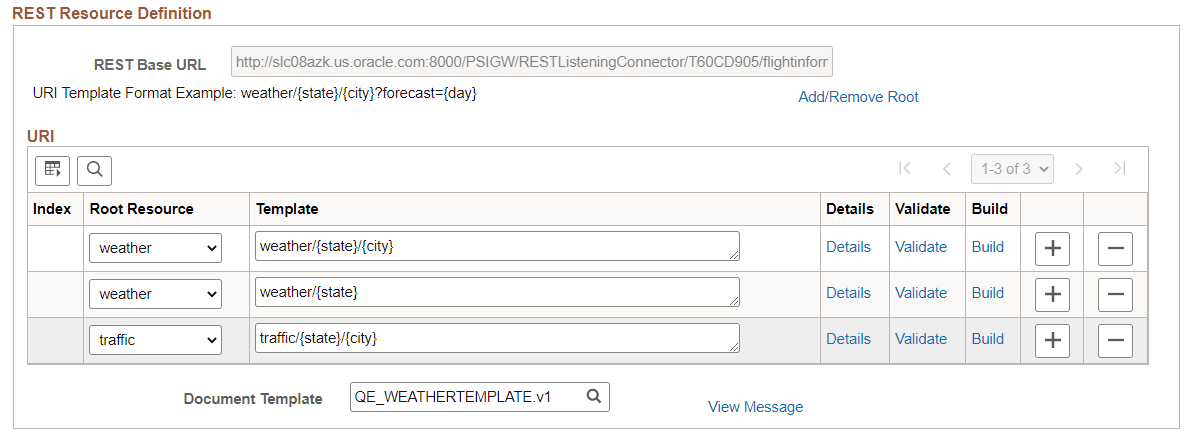
Enter the string starting with the root resource, using separators between variables and enclosing the variables in brackets {}.
This example illustrates Template URI strings.
Using the Build link
Note:
You must enter the Document Template field before you can use the Build option.
To use the Build link to enter the URI string:
-
Select the Document Template.
-
Select the Root Resource.
-
The root resource is added to the template field.
-
Click the Build link.
-
Add a separator when needed.
-
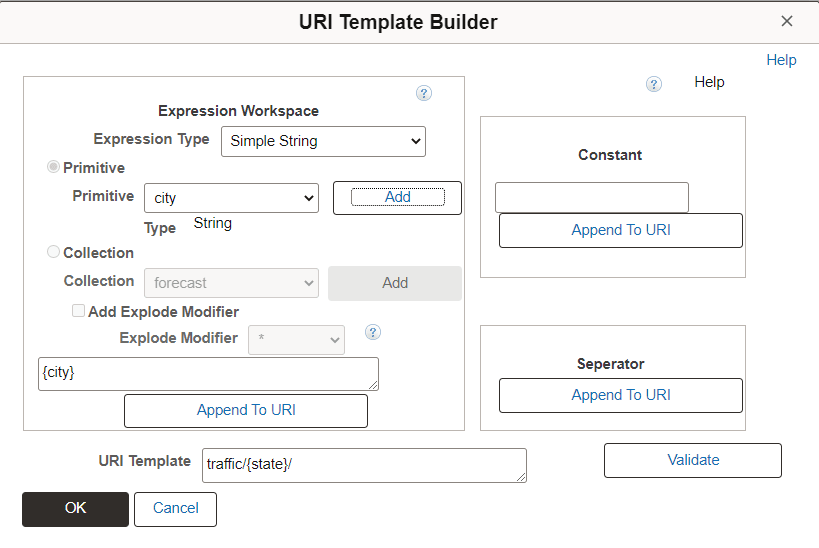
Select variables from the template and click Add.
The variable is displayed in brackets.
-
Click Append to URI.
The URI Template field shows the current value.
-
Repeat steps 5 to 7 for each variable to add.
-
Click OK when the URI template is complete.
This example illustrates the URI Template Builder page.
For additional information on the URI Template Builder, see Using the URI Template Builder