Entering Details for the URI Template
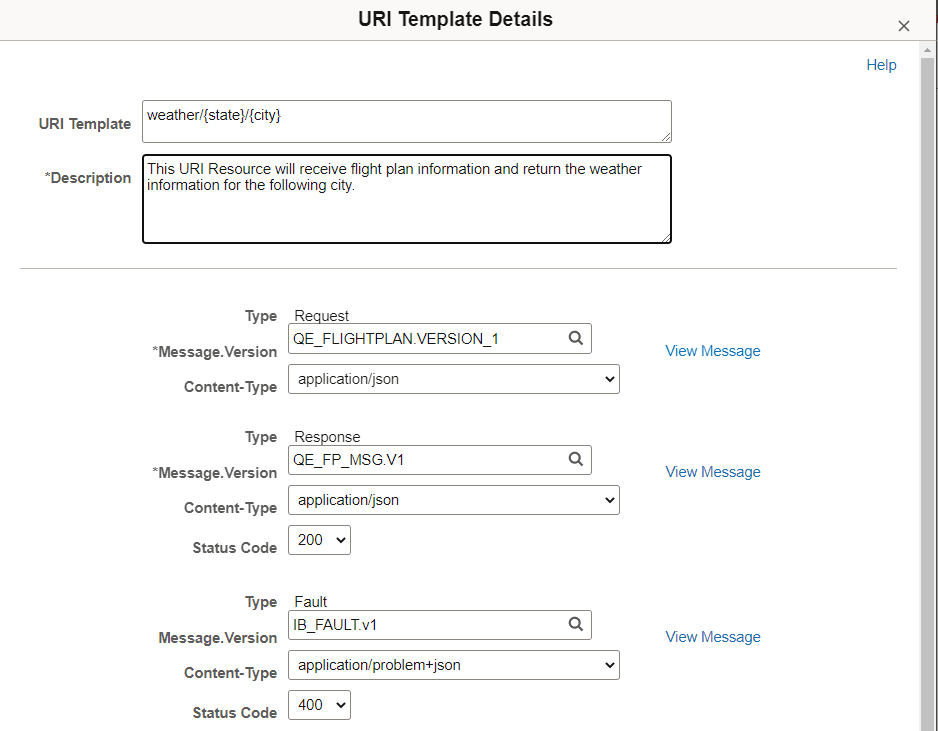
Use the URI Template Details page to define the messages for the service operation.
To add or modify the Details for a URI index, click the Details link for that row.
This example illustrates the URI Template Details page.
| Field or Control | Description |
|---|---|
|
URI Template |
The URI Template is displayed. |
|
Description |
Enter a description for the URI resource. |
|
Type |
Depending on the REST method, the required message types will be available on this page. Types are Request, Response and Fault. |
|
Message.Version |
Enter the message name followed by a dot and version, or click the Lookup button to search for a message. |
|
Content-Type |
Select the content type. The valid values are:
|
|
Status Code |
Select the Status Code from the drop down list. |