Using the URI Template Builder
Using the URI Template Builder page (IB_URIBUILDER_SEC) to build URI templates can simplify building complex or lengthy URIs.
The steps to build a URI template using the URI Template Builder page vary, depending on the document template defined and the business requirements and goals of each URI template.
To build a URI template using the URI Template Builder you must first define a document template in the resource definition. The document template must contain the values for the variables you plan to build out in the URI template.
To access the URI Template Builder select . The Service Operations – General page appears. In the REST Resource Definition section of the page, click the Build link.
This example illustrates the URI Template Builder page.
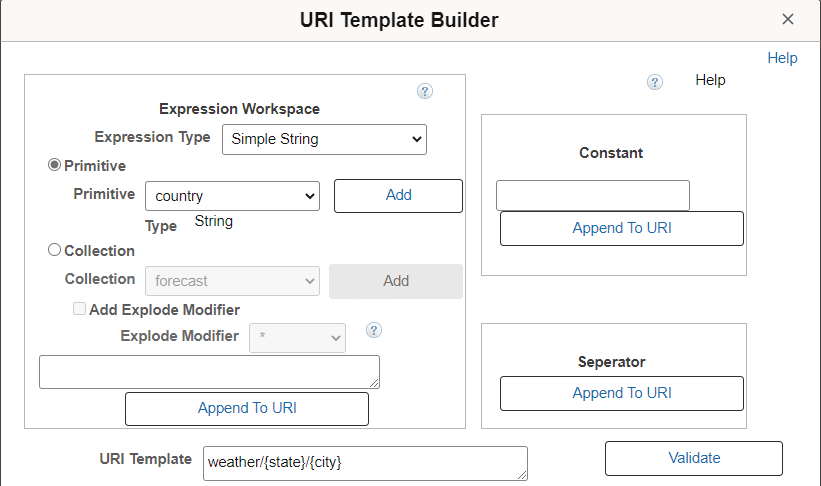
The URI Template Builder features three sections for building a URI template:
| Field or Control | Description |
|---|---|
|
Expression Workspace |
Use this section to build the expression. The system reads the document template defined for the resource definition and makes the primitive and collection variable elements defined in the document available to build the URI. After you build an expression click the Append to URIbutton to add it to the URI Template field at the bottom of the page. |
|
Constant |
Use this section to define constants and then append them to the URI Template field at the bottom of the page. |
|
Separator |
Use this button to append the value in the URI Template field with a forward slash (“/”). |
The following fields and controls appear on this page:
| Field or Control | Description |
|---|---|
|
Expression Type |
Select an expression type from the drop-down list. The values are:
The default is Simple String. |
|
Primitive |
Select the control to build an expression based on a primitive element contained in the document template. After you select the control select a primitive element from the drop-down list. By default this control is enabled. |
|
Type |
This read only field displays the data type of the primitive element selected. |
|
Add |
Click the button to add the selected primitive or collection element to the expression field at the bottom of the Expression Workspace. |
|
Collection |
Select the control to build an expression based on a collection element contained in the document template. After you select the control select a collection element from the drop-down list. Click the Add button to add the element to the expression field. |
|
Explode Modifier |
This control becomes enabled after you add a collection element to the expression field. Select an explode modifier from the drop-down list and click the Explode Modifier box to add it to the collection element in the expression field. Currently, the asterisk explode modifier (“ * “) is the only explode modifier supported. |
|
Append To URI |
Click the button to append the URI Template field with the expression, constant, or separator. |
|
Constant |
Enter a constant value to append to the URI. |
|
URI Template |
Displays the URI template string. |
|
Validate |
Click the button to access the Validate URI page to validate the URI template string. |
|
OK |
Click the button to populate the Template field in the resource definition with the value in the URI Template field and to return to the Service Operations – General page. |
|
Cancel |
Click the button to exit the URI Template Builder page without saving any information. |