Building URI Templates Manually
To manually build a URI template enter the URI string in the Template field in the REST Resource Definition section of the Service Operations – General page. The URI template expressions supported are described earlier in this topic.
To access the page select .
This example illustrates two URI templates added to a REST resource definition for a provider service.
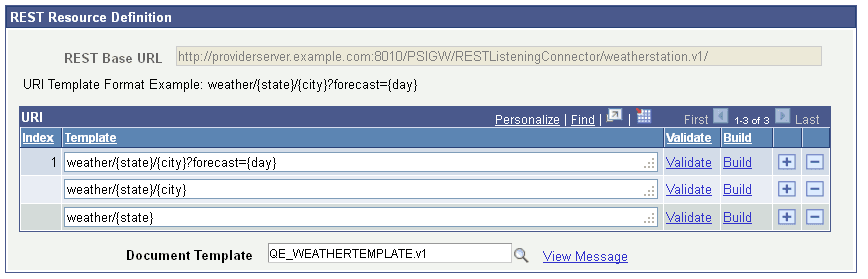
This example shows two URI template
strings added to template, weather/{state}/{city} and weather/{state}. Note that
neither of the added URI strings has an index value. When the page is saved, the
system assigns a sequential index values to each URI string added.
To manually build a URI template:
-
Access the REST Resource Definition section on the Service Operations – General page.
To access the page select .
-
In the URI grid, click the Add a Row button (+) to add a row for the template.
-
Manually enter the URI string.
-
Click the Save button.