Creating Container Messages
This section describes how to configure a Container message definition.
Use the Messages - Message Definition page (IB_MESSAGE_BUILDER) to configure a message after you create the message definition.
This example illustrates the Message Definition page for a Container message.
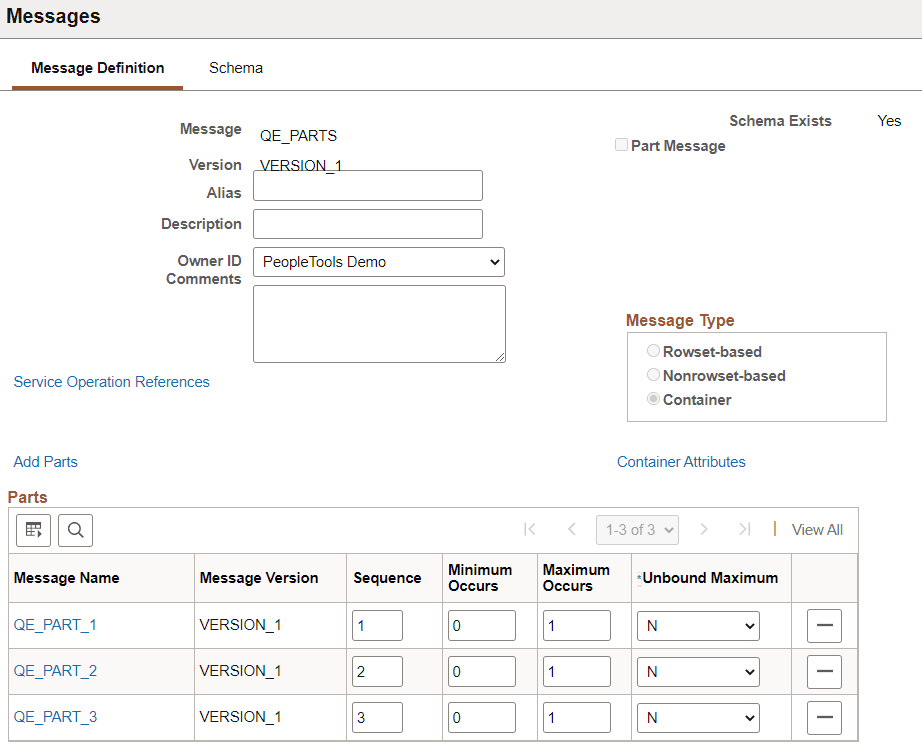
| Field or Control | Description |
|---|---|
|
Alias |
(Optional) Enter the name that the external system is expecting, if different from the value in the Message Name field. |
|
Part Message |
(Optional) Select the this check box if the message will be used as a message part in a container message definition. |
|
Add Parts |
Use the Add Parts link to add the message parts. |