Creating Rowset Message
This section describes how to configure a Rowset message definition.
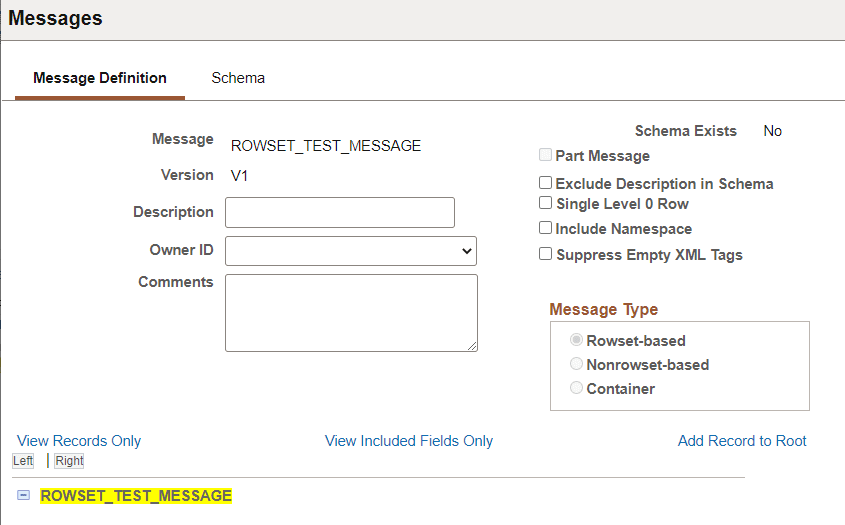
Use the Messages - Message Definition page (IB_MESSAGE_BUILDER) to configure a message after you create the message definition.
This example illustrates the Message Definition page for a Rowset-based message.
| Field or Control | Description |
|---|---|
|
Description |
(Optional) Enter a description for the message. |
|
Owner ID |
(Optional) Select the Owner ID from the drop down list. The owner ID helps to determine the application team that last made a change to the definition. The values in the drop-down list box are translate table values that you can define in the OBJECTOWNERID field record. |
|
Comments |
Optional Enter comments. |
|
Part Message |
(Optional) Select the this check box if the message will be used as a message part in a container message definition. |
|
Exclude Description in Schema |
(Optional) Select this checkbox if you don't want the description included in the schema. |
|
Single Level 0 Row |
(Optional) Select to include a single level 0 row in the XML message schema. If this box is not selected, then the system includes all level 0 rows in the message in the generated schema. |
|
Include Namespace |
(Optional) Select to include the namespace in the generated schema. |
|
Suppress Empty XML Tags |
(Optional) Select to suppress empty XML tags in message schema of rowset-based message. |
To build the rowset-based message, see Managing Rowset-Based Messages.