Defining Compression for Consumer REST Service Operations
This section discusses how to define compression for consumer REST service operations.
Understanding Setting Compression for Consumer REST Service Operations
A WADL document furnished to a REST consumer by a REST provider indicates if requests must be compressed and if so the compression method the provider system accepts. In addition, as a REST consumer you may require that responses from the provider be compressed and that the system can handle a specific compression method.
The two properties to use to specify message compression on consumer systems are Accept-Encoding and Content-Encoding.
For consumer request and response headers set compression as follows:
| Field or Control | Description |
|---|---|
|
Consumer Response Headers |
Use the Accept-Encoding property to indicate to the provider the compression method to use in its response to your consumer system. The valid options are:
|
|
Consumer Request Headers |
Use the Content-Encoding property to indicate to the provider the compression method used on the outgoing request. The valid options are:
|
Setting Compression for REST Consumer Service Operations
You use the Routings – Connector Properties page (IB_ROUTINGRESTCPRP) to specify the compression method used for the outbound request and the compression method(s) the system can accept for the provider's response.
To access the Routings – Connector Properties page, select
This example illustrates the Routings – Connector Properties page.
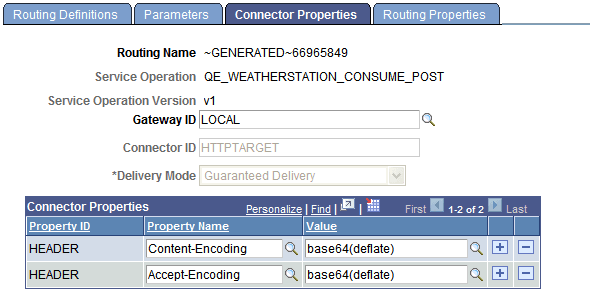
The previous example shows that on the REST consumer has set Content-Encoding and Accept-Encoding to base64 (deflate). By setting the Content-Encoding property to base64(deflate), the consumer is indicating that it is sending the consumer request to the provider base64 (deflate) compressed. By setting the Accept-Encoding property to base64(deflate), the REST consumer is indicating to the REST provider that it will accept a response that is base64 (deflate) compressed.
To set compression for consumer REST service operations:
-
Access the Routings – Connector Properties page:
-
Select and in the Existing Operations section click the name of the service operation. The Service Operations – General page appears.
-
Click the Routings tab and in the Routing Definitions grid click the name of the routing definition. The Routing-Definitions page appears.
-
Click the Connector Properties tab.
-
-
Set the request header.
-
In the Property Name field click the Lookup button and choose Content-Encoding from the list.
-
In the Value field click the Lookup button and choose the compression method used for the outbound request. The valid values are base64 (deflate) or gzip.
-
-
Set the response header.
-
In the Property Name field click the Lookup button and choose Accept-Encoding from the list.
-
In the Value field click the Lookup button and choose the compression method that the provider should use for the response back to the consumer. The valid values are base64 (deflate) or gzip.
-
-
Click the Save button.
The other options featured on the Routings-Connector Properties page are discussed elsewhere in the product documentation.
See Defining and Overriding Gateway and Connector Properties.